
 English
expand_more
 Español
 Deutsch
 Français
 Português
 Türkçe
 Polski
 العربية
 हिन्दी

What services can you sell on Fiverr using Labrika? From Gig to delivery
On Fiverr, buyers order specific work: a website audit, keyword grouping, articles, or product descriptions and prices collected from a website. Labrika gathers data, identifies problems and produces reports you can deliver under your own brand. Below are six service ideas and a detailed walkthrough of your first order: a store audit with a document, error spreadsheets and a prioritized action plan.
Choose a service with a clear scope and deliverable
A Gig is your service listing in Fiverr's marketplace. It tells buyers what they will receive, at what price and by when. Choose an offer from the table: the quantities are example order scopes, not Labrika limits.
| Suggested Gig title | Buyer and purpose | Scope of one order |
|---|---|---|
| I will audit your website's SEO and create an action plan | A store owner preparing for SEO or reviewing a redesigned website. | One domain, up to 1,000 pages, one audit; DOCX, XLSX and guidance on the first tasks. |
| I will group your keywords and optimize your pages | An SEO specialist or new site owner planning categories, services and articles. | Up to 500 keywords and three existing texts, one search engine and location; grouped keywords in XLSX, optimized HTML copy and meta tags. |
| I will optimize three existing pages for your target keywords | An editor or store owner adding relevant terms to approved copy. | Three texts and keyword groups; HTML for each page, plus Title, Description and H1. |
| I will write a detailed article for your company blog | A company that needs a buying guide or an explanation of its service. | One agreed topic and word-count range; an article in HTML and TXT. |
| I will deliver a branded GEO audit and action plan | A company assessing its presence in AI recommendations. | One brand; a PDF with your logo and an initial action plan. |
| I will collect product descriptions and prices from a website | A store comparing inventory or a content manager preparing a catalog. | For example, 20 product pages from one website; XLSX with URL, name, SKU, price, availability and description. |
A small publicly accessible website audit is a useful first order: Labrika organizes issues by report, lists affected URLs and prepares a printable document. Follow the steps below on your own site or an agreed test site to create a sample deliverable for prospective buyers.
Create your first Gig: audit a store with up to 1,000 pages
Create a Fiverr seller profile and open My Business → Gigs → Create a New Gig in a desktop browser. Choose the appropriate SEO service category. Fill in the title, description, scope, delivery time, price and requirements. See Fiverr's Gig creation guide for the process.
Copy you can adapt for your own offer
Title: I will audit your website in Labrika and provide an SEO action plan.
Description: I will check your website before an SEO campaign or after an update. I will identify unavailable pages, broken links, redirect, canonical and meta tag issues. You will receive a results document, full affected-URL tables and a prioritized fix list. I will explain where to start and where a developer should look for each problem.
Scope: one domain, up to 1,000 pages, one full analysis. If keyword checks are included: up to 10 client-supplied terms, Google, Seattle, desktop.
Delivery: a DOCX report for your project, XLSX attachments and a short explanation of priority tasks. I will answer questions about the delivered findings.
Requirements: website address, main products or services, target location, up to 10 important pages and up to 10 keywords if ranking checks are needed. State your goal: starting SEO, checking a new site version or investigating technical problems.
Delivery time: for example, two business days after receiving the information. Implementing fixes and rerunning the audit are separate services.
Before publishing, replace the location, scope and delivery time with your own terms. Use the same figures in the description and package fields. A clear cover could say “SEO audit + error spreadsheets + action plan”. Show an excerpt of your test report with a few URLs and tasks as the work sample.
Price the whole order: Labrika analysis, setup and review time, client questions and marketplace fees. For example, a $100 sale with $20 in service costs leaves $80 before platform fees and your time. This is an illustrative calculation, not a Labrika rate or net profit. Fiverr package prices are listed in USD.
Receive the order and run the site audit
Suppose the client provides shop.example, a Seattle coffee machine store with about 240 pages. Their priority is the catalog and product pages they plan to promote. Confirm this scope in the order conversation. A publicly accessible site can be analyzed from its address; admin access is needed later if you implement changes.
- In Labrika, click “Add new site” and choose “SEO Audit”. The “AI-led SEO toolset” form opens.
- Enter the client's domain in “Domain name:”. For “Number of pages to scan:”, choose sufficient capacity within the agreed scope: 1,000 in this example.
- If keywords are included, add them under “Keywords”. In “Search Engines”, select the agreed engine, location and device: Google, Seattle, desktop in this example.
- Click “Create a project”. The full analysis launch dialog opens; review credit usage and click “Start”. Wait for the audit to finish.
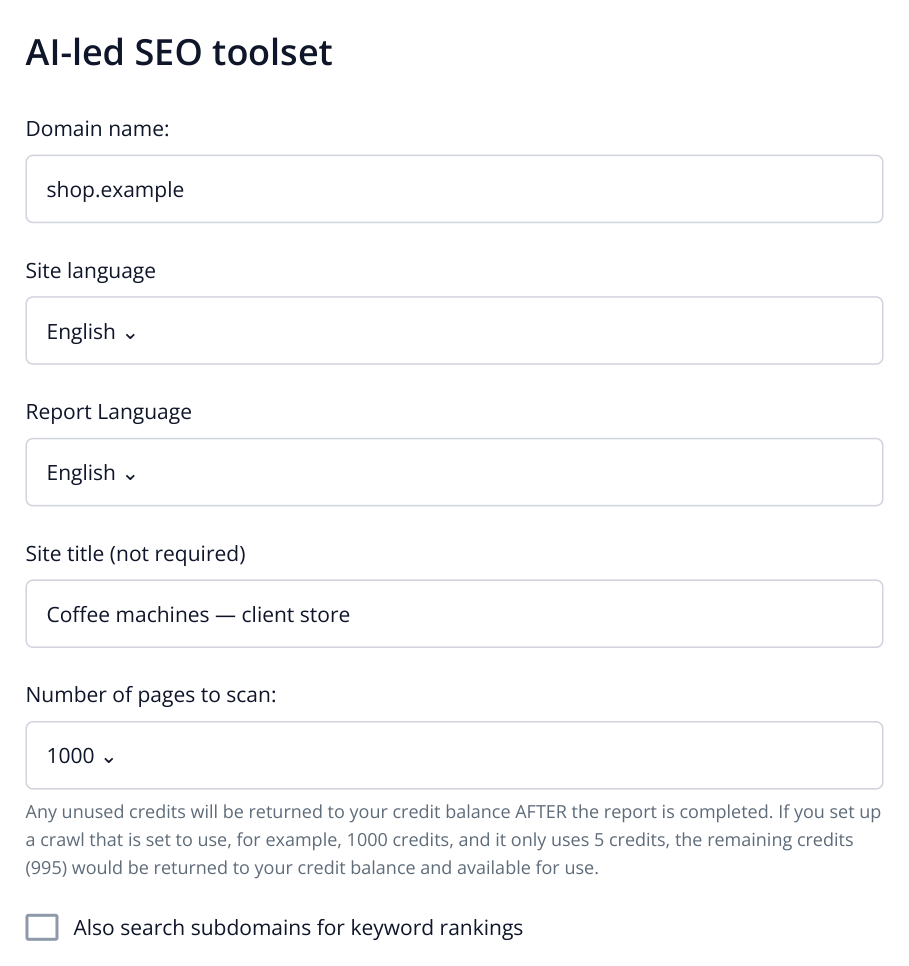
1. The top of the form after selecting “SEO Audit”. Keywords, search engines and “Create a project” appear below. The example allows up to 1,000 pages.
For an order covering one section, expand “Crawler Settings” in site settings. “URL restrictions” specifies the addresses; “Skip all other pages” restricts crawling to the exact list. “URL exceptions” excludes unwanted addresses. For a whole-store audit, retain the full site scope. See the JavaScript website guide for both lists and JavaScript settings.
After analysis, compare the crawled page count with the agreed scope. If you expected about 240 pages but only the homepage appears, investigate crawling first; that result does not yet cover the store you were hired to audit.
Find errors and show where to fix them
In the selected site's menu, open “SEO” → “Technical Audit” → “4xx errors”. A 404 means the page was not found at that address. Here, a category links to a removed coffee machine page, so buyers get an error when opening the product.
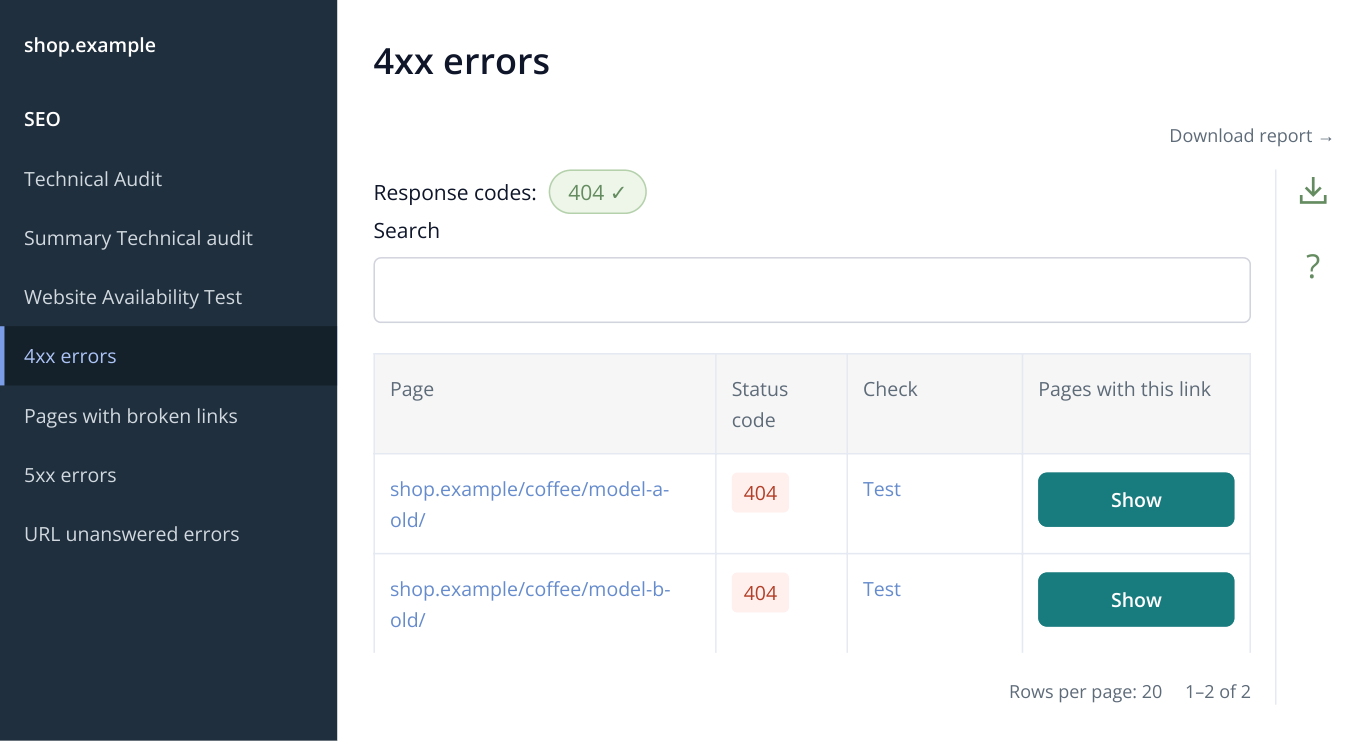
2. Part of the menu and “4xx errors” report. “Show” opens pages containing the link; the arrow in the right-hand toolbar downloads the table. All URLs and results in this article are illustrative.
In the /coffee/model-a-old/ row, click “Show” under “Pages with this link”. The dialog lists the URLs and TITLEs of pages containing that link. You can now give the developer both the broken address and the places where it needs replacing.
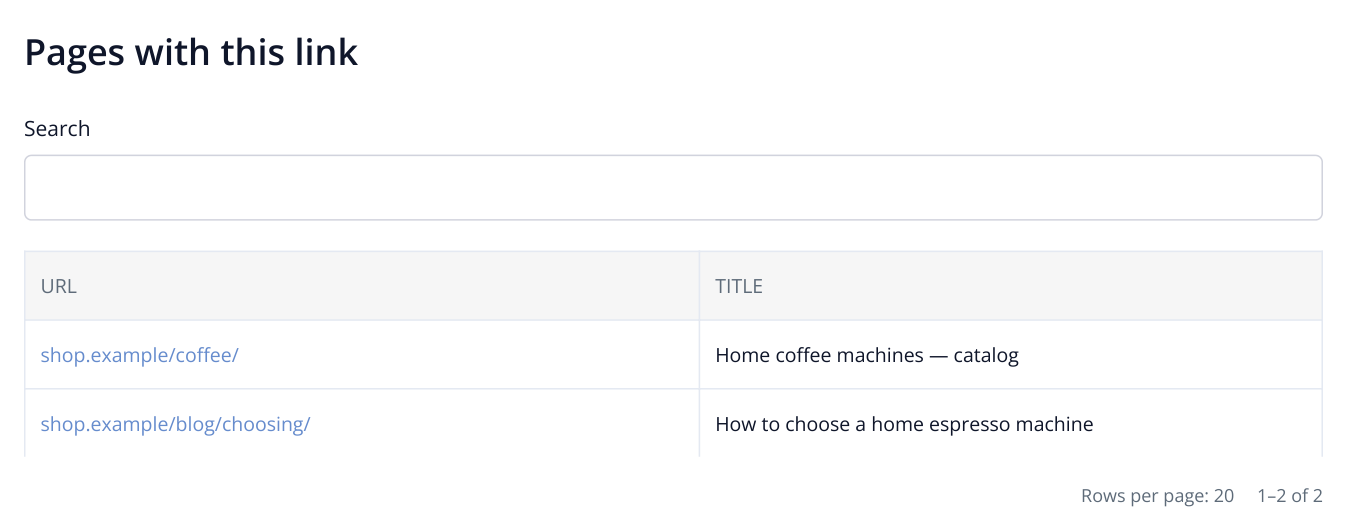
3. The dialog for /coffee/model-a-old/. These two pages link to the removed product, showing the developer where to replace it.
Example explanation for the client: “The /coffee/ category links to the removed /coffee/model-a-old/ product. Replace it with /coffee/model-a/. If the product moved, redirect the old address to the new one.” Confirm the current URL in the client's catalog.
Review the other main reports in the same way. The table uses actual menu names; start with the pages important to the client.
| Where to open it | What to inspect | What to give the assignee |
|---|---|---|
| SEO → Technical Audit → 5xx errors | Pages returning server errors. | URL, response code and check date, with a task to restore availability. |
| SEO → Technical Audit → Pages with broken links | Working pages that send visitors to a broken link. Click “Show” in the row. | The source page and link addresses to fix. |
| SEO → Technical Audit → Pages with rel=canonical tag | The preferred version each page points to. For a live catalog, investigate unexpected canonicals to another domain. | Source URL, current canonical and correct preferred version. See the canonical review example. |
| SEO → Technical Audit → Multiple (chained) redirects | Redirect chains before the final destination. | Initial and final URLs, with a task to shorten the chain and update internal links. |
| SEO → SEO Audit → Summary SEO Audit | Other findings and links to their detailed reports. | Specific work on important pages, such as fixing duplicate category titles. |
You do not need to copy every URL manually; Labrika's tables preserve them for the developer. Your explanation connects the finding to the order's goal: restoring access to a product, correcting a preferred version or fixing navigation from a category.
Export the full table or a selected section
In “4xx errors”, click the downward arrow in the right-hand toolbar. Its tooltip is “Download report”. “Export settings” opens.
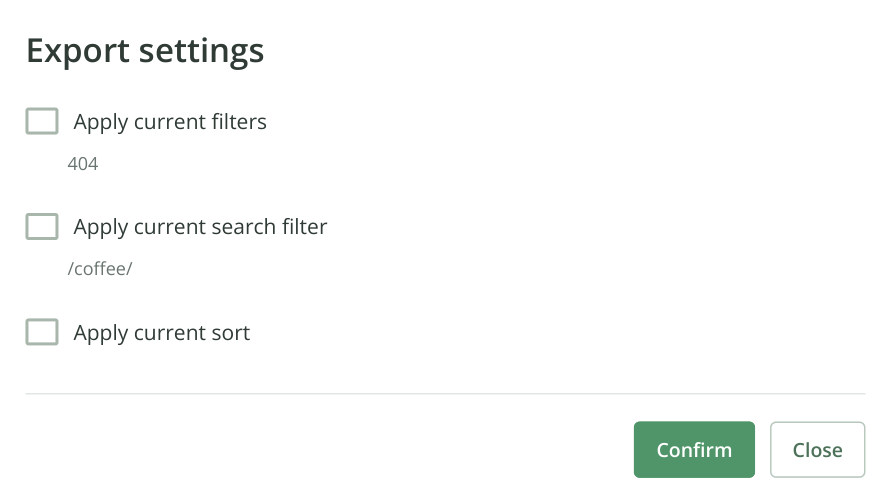
4. The “4xx errors” export dialog. Table and search filters are off, so the full list will be downloaded. This report exports to XLSX.
For the full list, clear “Apply current search filter” and “Apply current filters”. For one section, first find it in the table, for example by searching /coffee/, then enable “Apply current search filter”. If you selected status 404 or other conditions, enable the relevant filter checkbox. Click “Confirm” to prepare and download the XLSX report.
Open the file and compare its first URL with the report. Rename it for delivery, for example 02_4xx_errors.xlsx. Export the other tables you need in the same way. You can also obtain all attachments with the document in the next step.
Build a document with your name and logo
In the left menu, open “SEO” → “Print version” → “Site summary report”. The page heading is “White label:”; this is where you brand the document.
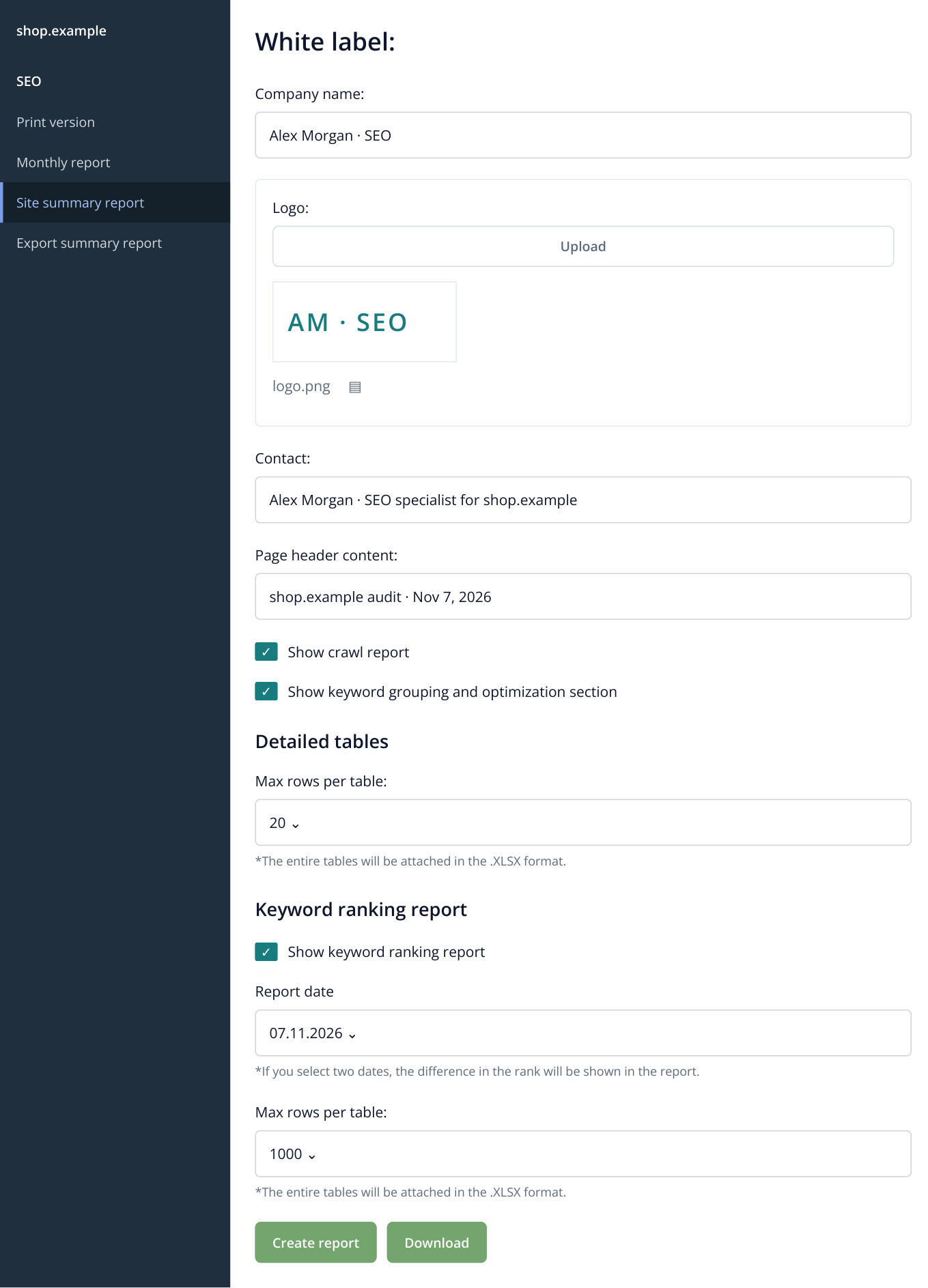
5. “Site summary report”: document branding and contents. The 20-row setting limits tables in DOCX; XLSX contains the full data. “Download” appears once the archive is prepared.
- Fill “Company name:” with your name or studio name. Under “Logo:”, click “Upload”, upload PNG or JPG/JPEG and check the preview.
- Add your contact details and “Page header content:”, such as “shop.example audit · Nov 7, 2026”.
- Keep “Show crawl report” enabled. Include keyword grouping and optimization sections when keyword and content analysis formed part of the order.
- In “Detailed tables”, choose, for example, 20 rows. This controls tables inside DOCX; full lists are included as XLSX attachments.
- Include a ranking report if it is in scope. Select two available dates for a comparison; for a first analysis, deliver a snapshot for one date.
- Click “Create report”. Wait for archive preparation and download; “Download” lets you download it again.
Unzip the archive: it contains DOCX and XLSX tables. If you promised PDF, open DOCX in Word or LibreOffice and save as PDF. This Labrika workflow creates an editable document with attachments. Before delivery, check the domain, date, logo and audited page count.
Add an action plan and deliver the order
To manage fixes in the project, open “Boards” → “+ Create a board” → “Generate a board based on a website analysis”. Enter “shop.example fixes” in the naming dialog and click “Create”.
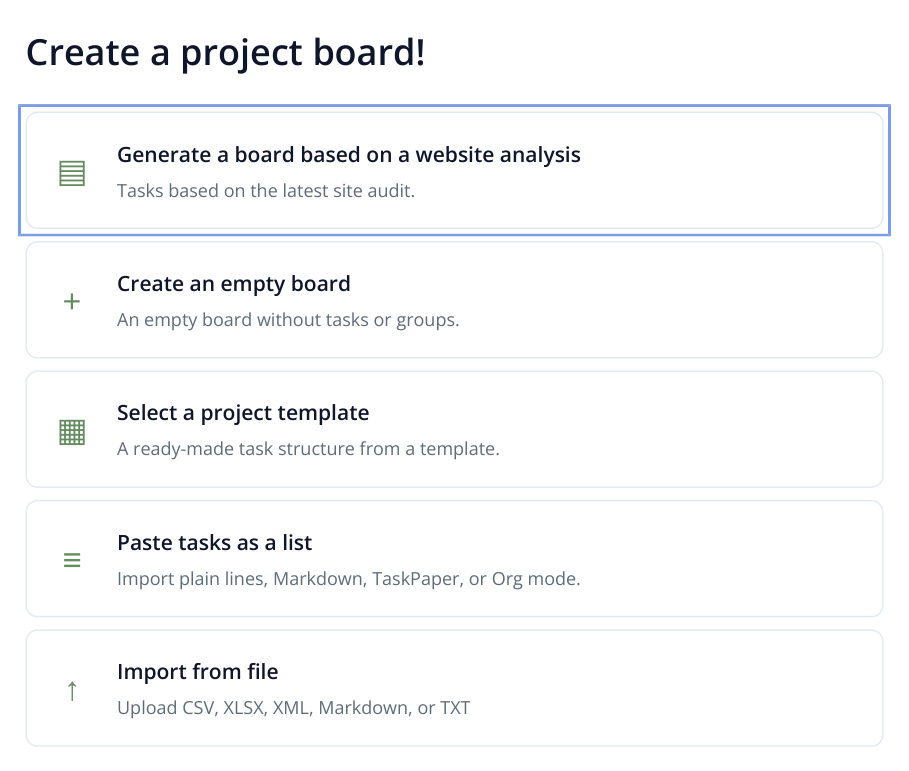
6. Board creation methods. For a completed audit, choose the first option: Labrika generates a prioritized plan from its findings.
Labrika creates tasks in priority order, with links to reports and help. In your delivery note, list the first tasks and affected sections; keep full URL lists in the attachments. If the client continues in Labrika, invite them and the implementation team, assign deadlines and manage delivery in Kanban or a Gantt chart. See tasks and boards and invitations and access.
Example delivery message
Audited shop.example: 240 pages, Google / Seattle / desktop, November 7, 2026. The archive contains the DOCX audit and full XLSX tables. A separate note explains the first tasks.
Start by restoring the category page returning 503. Then replace links to removed products: the 4xx table lists broken destinations, and the note identifies the catalog pages containing them. Next, review canonicals and category titles. Website implementation was not included in this order.
Attach the files to the Fiverr order and submit delivery with a message like this. The buyer should receive the promised package inside the order. You can add a link to an interactive Labrika report: click “Get a link to the report” in its right-hand toolbar and copy “Report link”. It opens the selected report without registration; see the single-report sharing guide.
If the client hires a developer to implement fixes, offer a follow-up audit. It has a clear separate deliverable: which errors disappeared, which remain and whether new ones appeared. A before-and-after comparison also helps assess another contractor's work.
Service 2: group keywords and optimize pages
What to sell: map an existing keyword list to landing pages and optimize agreed pages. For example: up to 500 terms, one engine and location, and three existing texts. The client receives a search strategy structure and publishable versions of the content.
What to request: keywords, location, domain, page URLs to improve and offer facts: products, specifications and service terms. State the number of optimized pages separately from the keyword count. If keyword research is also required, list it as an additional part of the scope.
- In site settings, open “Keywords” and paste or import the list. Set location and device in “Search Engines”, save and run a full analysis.
- Open “SEO” → “Optimization and KW grouping”. Labrika groups terms by landing page. Review the intent: purchase terms belong to a category, rentals to a service page and model-selection questions to an article.
- For each selected group, click “Change the link”, enter its URL in “Specify URL of landing page.” and click “Change”. A planned page can use its future address.
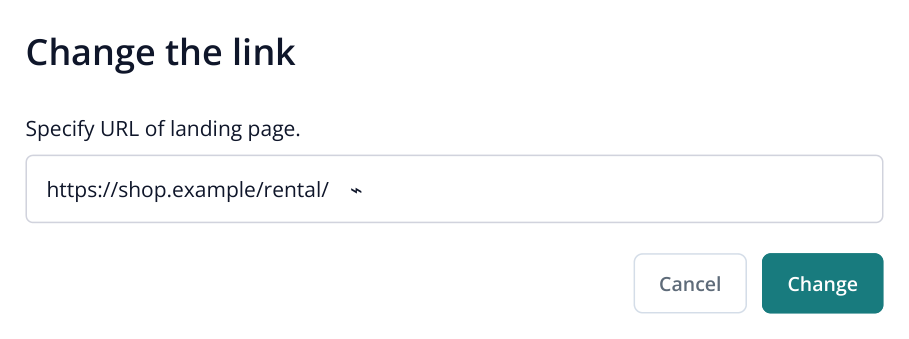
7. The rental group is assigned to the future /rental/ URL. This connects the keywords to a specific page in the site plan.
- For a group with existing copy, click “Content Optimizer”. Review Title, Description, H1 and Body. Body should contain only the article, without menus or the footer. Click “Test”.
- Above Body, click “Optimization in 1 click”. To improve the copy without matching competitors' length, enable “Do not adjust text length to TOP-10”, review the cost and confirm. Labrika inserts missing keyword phrases into the existing sentences.
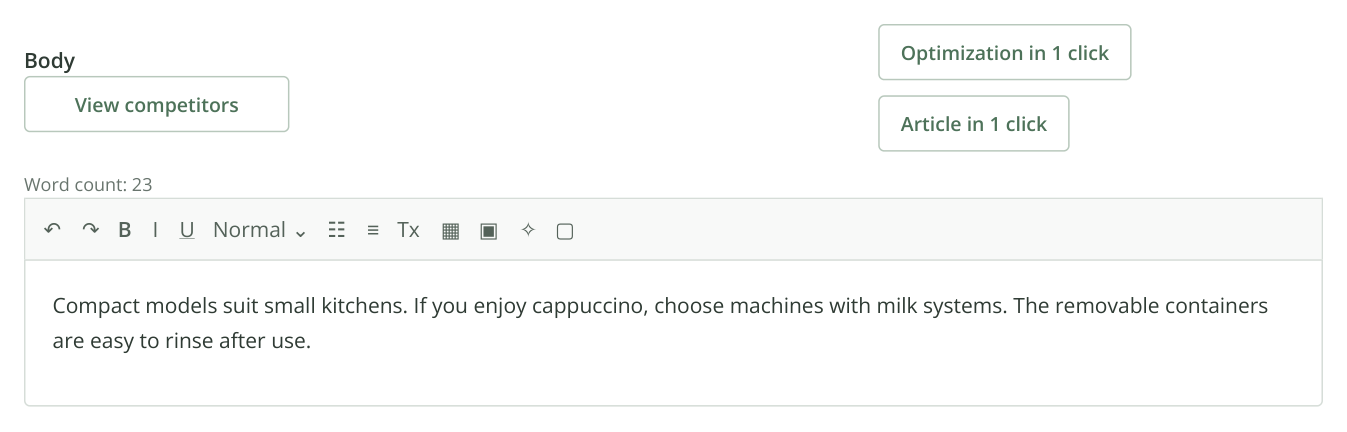
8. Three sentences of original copy. The two mode buttons are above Body on the right; the word counter, formatting toolbar and text are below. “Optimization in 1 click” adds missing phrases to this material.
- Click “Show new version of the article”. Compare the original, insertions and result. Click “Accept Changes”, then “Test”. Repeat for the agreed pages.
- Click “Copy html to clipboard” in the Body toolbar and save each text as a separate HTML file. Include Title, Description and H1 with its URL. In the main keyword grouping report, click “Download report” on the right to export the groups and landing pages to XLSX.
What to deliver: the keyword-to-page XLSX, three HTML files and meta tags with publication URLs. For example: “The rental group is assigned to /rental/; maintenance terms were added to its copy. HTML is attached, and meta tags are in the accompanying file.” The client can see where each result belongs. Include CMS publication only if agreed in advance.
For a new site, create the missing pages for the selected groups first. For an established store, this package improves existing categories and service pages. The prepared landing pages can also support paid search. See keyword grouping step by step and the detailed one-click optimization example.
Service 3: optimize existing copy for target keywords
This smaller order suits a client whose keywords are already mapped to pages and who only needs existing content optimized. Full keyword analysis and grouping belong to service 2 above.
What to request: three URLs or source texts, target keywords for each page, the location and facts that must remain intact: products, specifications and service terms. State the maximum length of each source text in the scope.
Add the keywords to the project and run a full analysis for recommendations. In “Optimization and KW grouping”, find the group and click “Content Optimizer”. Keep only the content in Body, without menus or the footer, and click “Test”. Then click “Optimization in 1 click”; enable “Do not adjust text length to TOP-10” to preserve the length and start optimization.
Open “Show new version of the article”: changes are marked on the left, the new text is in the center and recommendations are on the right. AI inserts keywords into existing sentences. Check added attributes against the client's product, click “Accept Changes”, then “Test” to save the version.
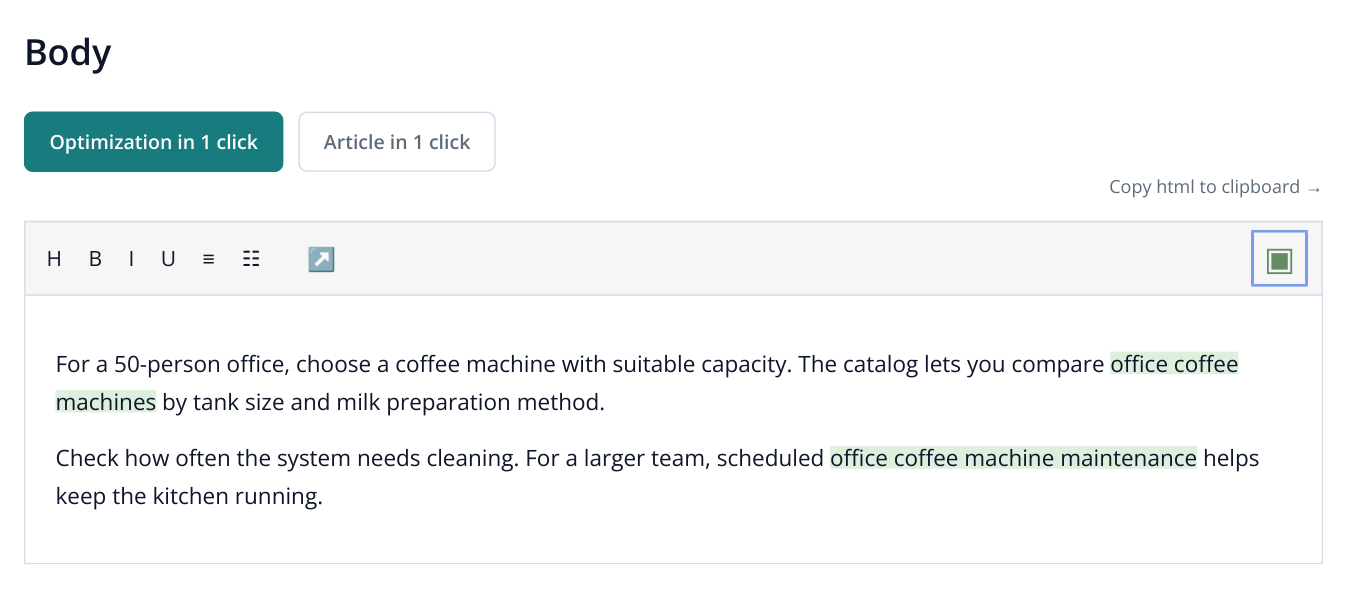
9. Part of the editor after accepting the version. Added phrases are highlighted for explanation; you choose the formatting for the final copy. The button on the right of the toolbar copies the full content as HTML.
What to deliver: click “Copy html to clipboard” in Body and save the contents as coffee-office.html. Attach Title, Description and H1 separately with the page URL. State where each text belongs in the message. CMS publication is included only by separate agreement. See the illustrated optimization walkthrough.
Service 4: write a company blog article
What to request: topic, audience, business sector, language and desired word-count range. For example, a 3,000–6,000-word guide titled “How to choose a coffee machine for a 50-person office”. The client can optionally provide product information.
- Open “AI writer” → “My documents” → “New document” → “Expert Article”.
- Fill in “Website/Business field for which this text will be used” and “The title of the article”. Select the language and client folder, then click “Create”.
- Choose the agreed range in “Document size, words” and click “Write an article”. Labrika analyzes the topic, builds a structure and creates the article.
- Use the client's information to refine company specifications and terms in the editor. Click “Save and close”.
- In “My documents”, open the row menu with three horizontal lines. Choose “Download in HTML”, then “Download in TXT”.
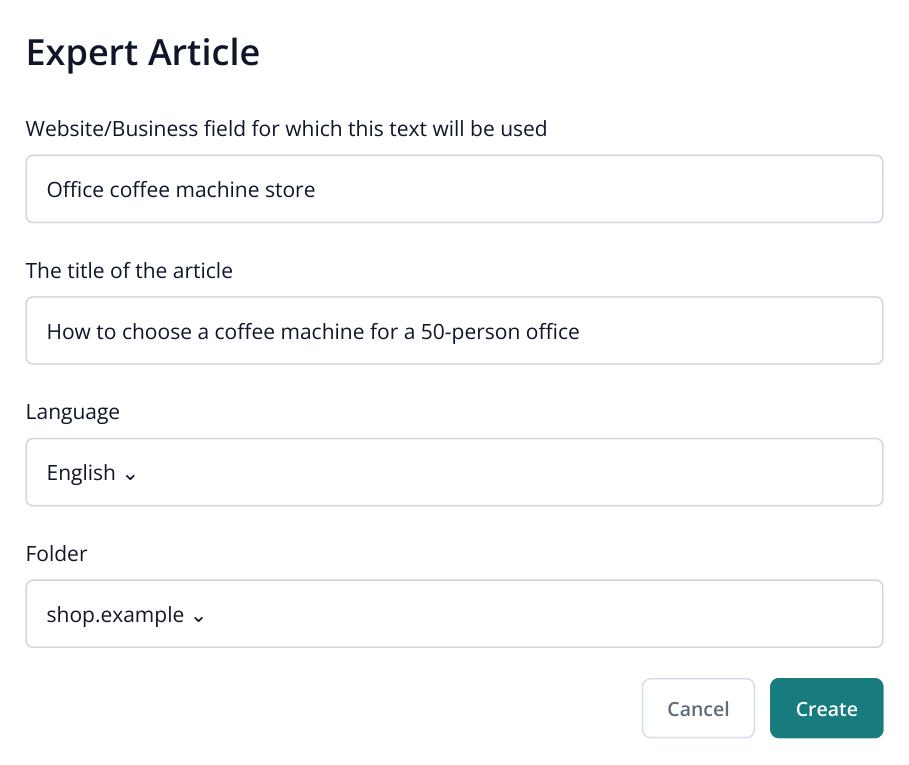
10. Creating an expert article. The business field and title define the topic; the word-count selection and “Write an article” appear on the next screen.
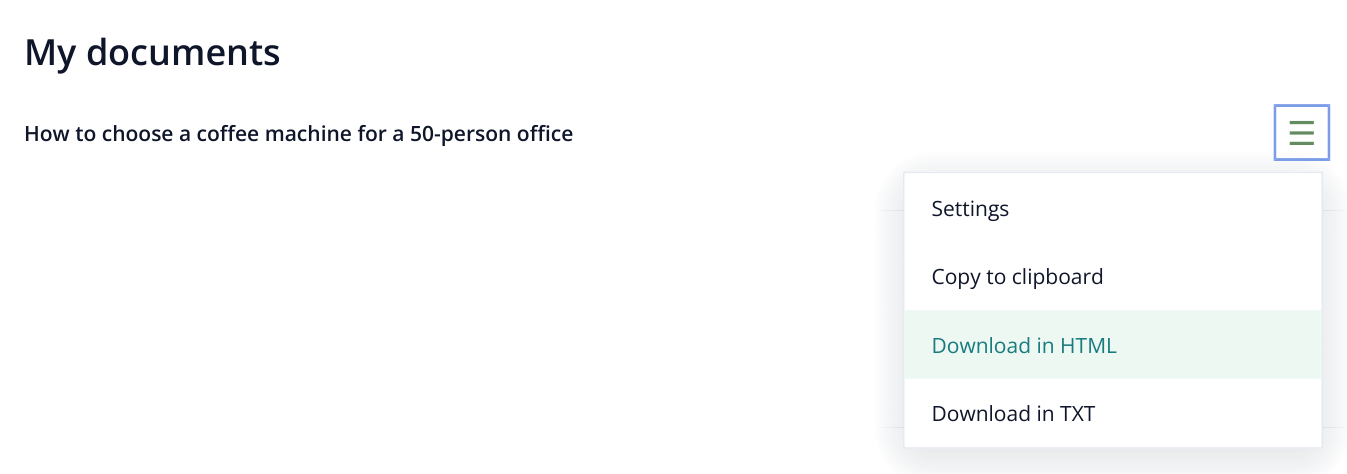
11. Part of a completed document row with its menu open. Export HTML for the website and TXT for plain-text delivery.
What to deliver: both files and the article title in the order message. HTML retains headings, lists and tables for publication; TXT is convenient for reading and further editing. For a series, agree on the topics and number of pages; “Content Factory” can generate them in a batch. See the expert article guide.
Service 5: a branded GEO audit and action plan
What to sell: a branded PDF explaining how AI represents the company, which competitors and topics appear in the analysis, and what to improve. Business owners can use it to prioritize work; agencies can use it to discuss strategy with clients.
Request the domain, correct brand name, location and main services. Run a GEO audit and open “AI Audit”. In “What will AI tell?”, check whether the offer is described accurately. Review the competitive picture in “Who is shown and why” and “What affects visibility”. Use “How to improve visibility”, “Important content for AI” and “Registration Directories” to select website and external placement tasks.
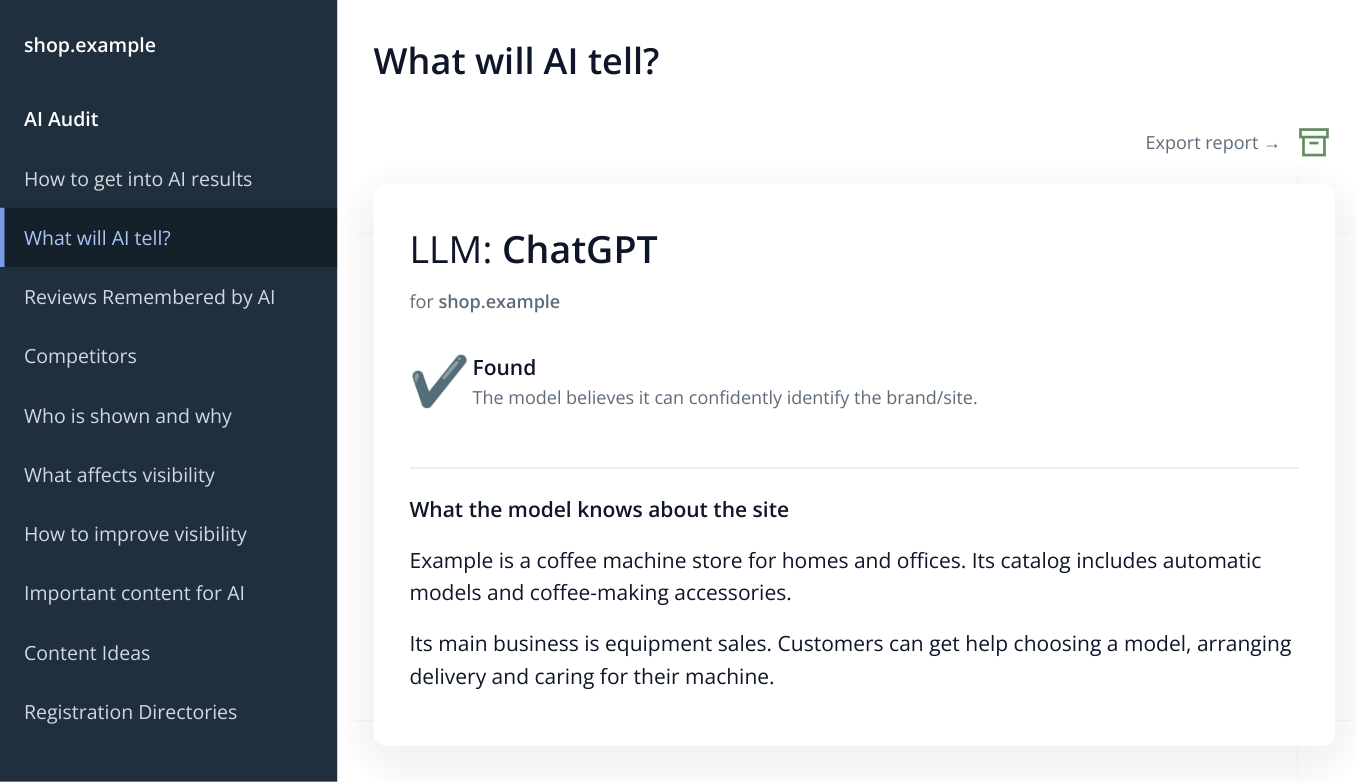
12. Report excerpt with an illustrative answer: the model described sales but did not mention rental. Check how the service is presented on the website. Prepare a branded PDF of the complete GEO audit next.
Prepare a PDF with your branding:
- In “AI Audit”, open the printable report version.
- Fill “Company name:” and “Contact:” with your own or your agency's details.
- Under “Logo:”, upload PNG or JPEG, check the preview and click “Save”.
- Choose PDF in “File format” and click “Create report”. Wait for preparation and download.
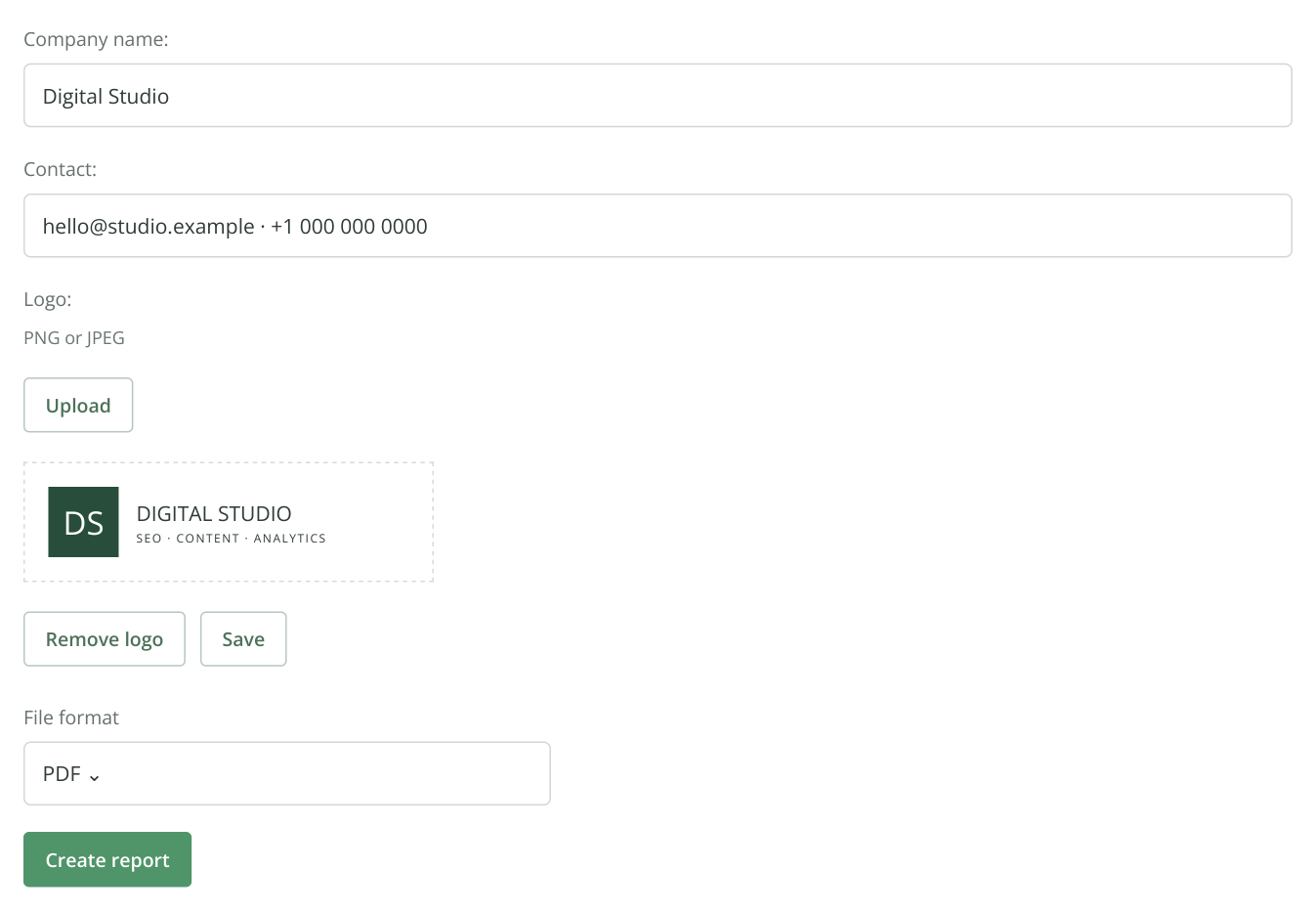
13. GEO audit print settings: company, contact details and uploaded logo. PDF is selected; “Create report” starts file preparation. Agency details are illustrative.
What to deliver: the branded PDF and a short plan addressing the gaps found. For example: “Add rental to the company description; explain maintenance on /rental/; update listings in two industry directories.” Specify a URL or platform and expected outcome for each task. See how to build this plan from SEO and GEO reports.
A separate follow-up service is checking AI recommendations for buyer questions. Take questions from “Prompt ideas”, agree on the list and assistants, then run “Brand Visibility”. The client receives saved answers and competitor comparisons for the selected scenarios. Set up the first check.
Service 6: collect product descriptions and prices
What to sell: product data collection in XLSX. For example, 20 pages from one store with URLs, names, SKUs, current prices, availability and descriptions. This helps compare a supplier catalog, research competitor inventory or prepare a content manager's spreadsheet.
What to request: URLs, required fields and an example output row. Clarify whether the description should be a short summary or a detailed specifications block, and whether to collect the current, old or selected-configuration price. Use separate rules for different product page templates and include them in the agreed scope.
- Create a monitoring project, select “Price monitoring” and open rule creation. Name the rule after the store and product page type.
- Configure “Product name”, “SKU”, “Price” and “Availability”. Use “Backup field” for the description: it can extract a selected text block, not just a number.
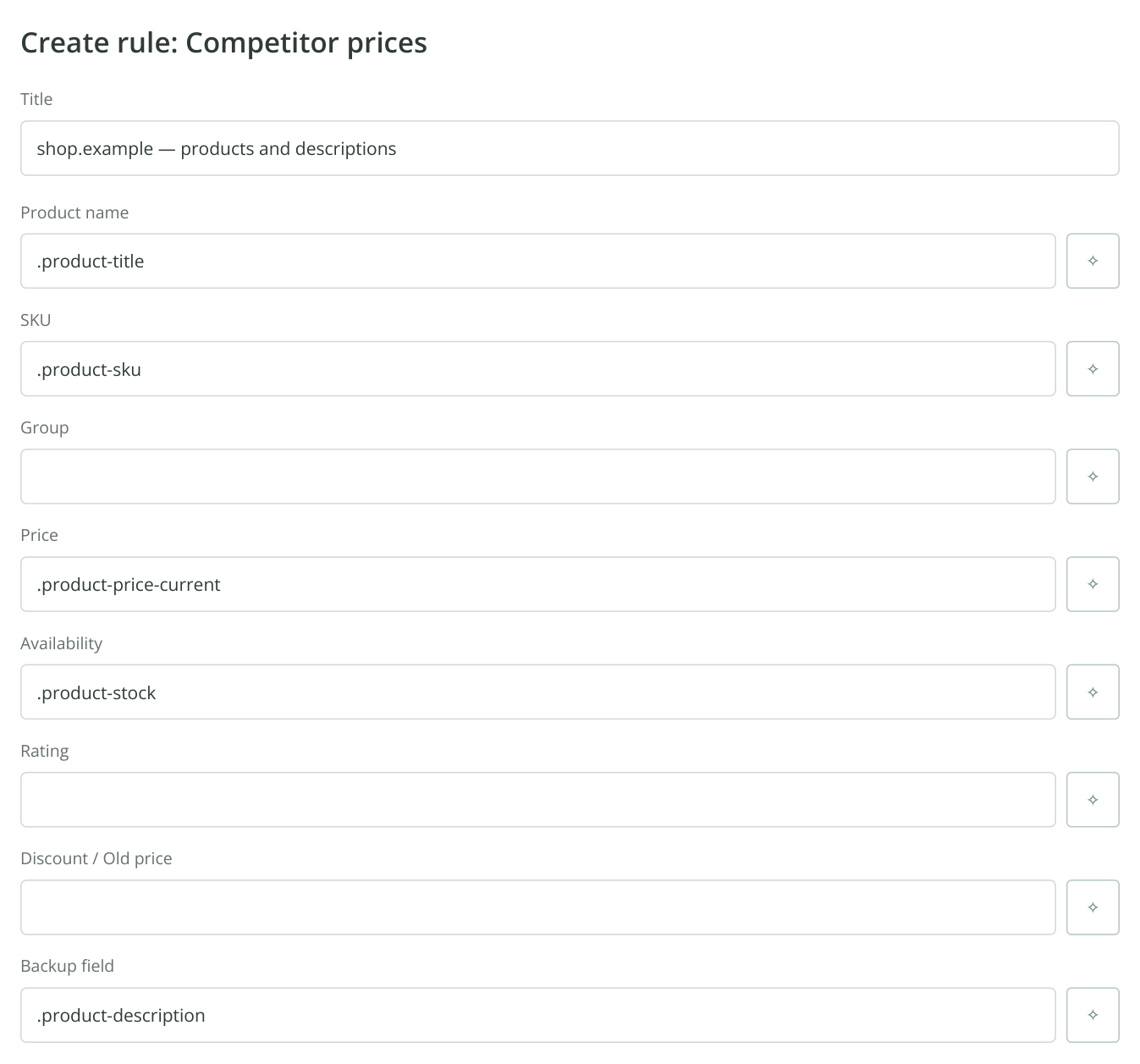
14. Part of the collection rule. “Backup field” is configured for the product description. The expressions are examples for a fictional store; each field's wand opens suggestions for your own page.
- Click the wand in the field you are configuring. Enter a product URL in the helper and click “Load”. Enable “Render JavaScript” if the content appears only after scripts run.
- In “Suggest from visible text”, paste the beginning of the description or the visible current price and click “Suggest”. Click “Test” for a suggested expression. For descriptions, the first match should contain the complete required block; for prices, it should contain the purchase price, excluding the crossed-out old amount.
- Click “Use” to return the expression to the selected rule field. Test it on two or three more pages using the same template. If JavaScript is needed, also enable “Run JavaScript during checks” in the rule itself.
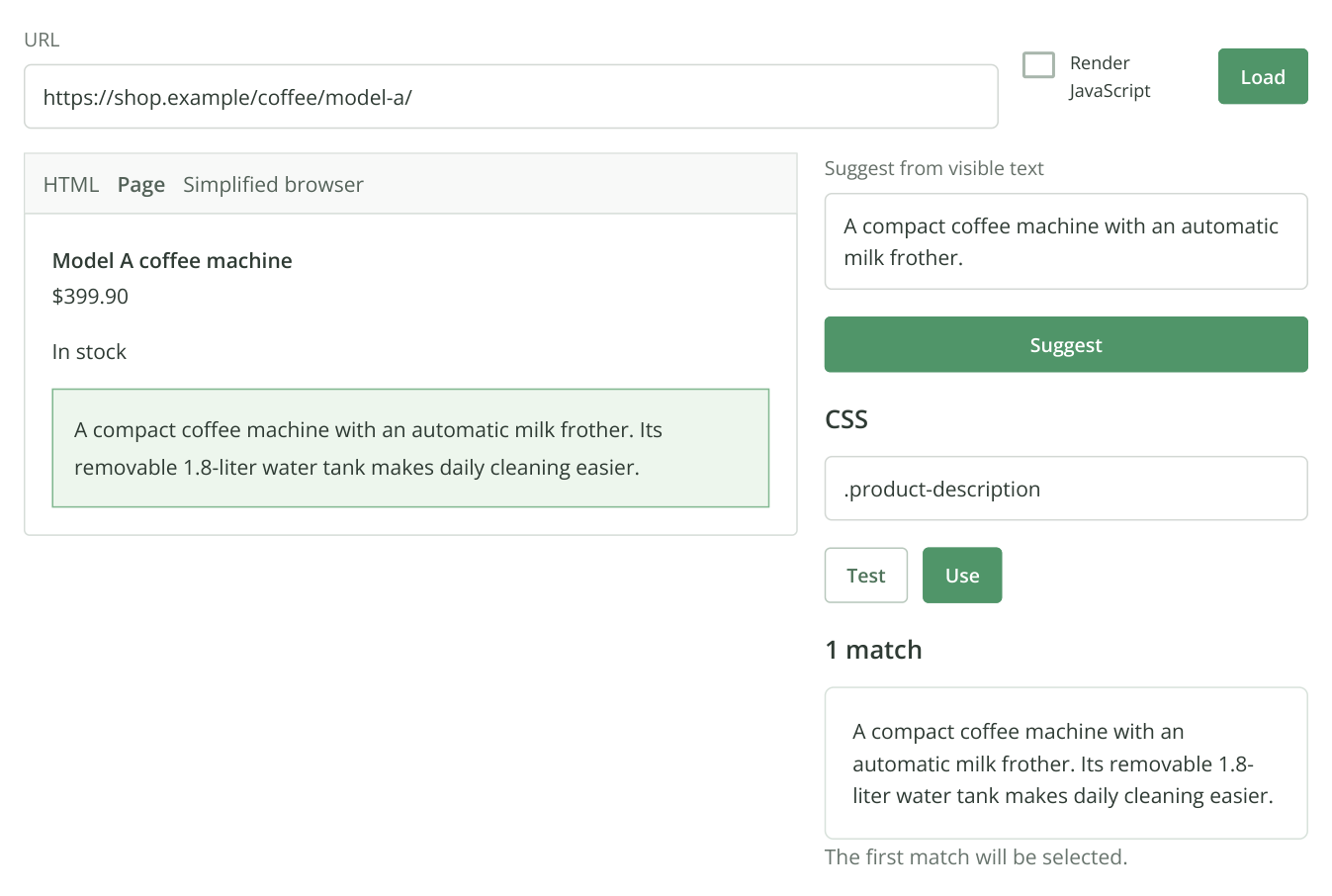
15. Selecting an expression for “Backup field”: the result contains the full description. Check that it is the product's own text, then click “Use”. This helper excerpt uses an illustrative store and CSS selector.
- Save the rule. Add the URL list in the next step, continue to the page list and confirm the rule is assigned. Click “Start analysis”, confirm the cost and wait for results.
- Open “Price and availability monitoring”. Use the “Configure column names” gear to rename the eighth field “Product Description” and save. Renaming changes the heading; the rule's expression determines which description is extracted.
- Select the completed run and check prices and text in several rows. Click “Export to XLSX”. For a single snapshot, leave “Show comparison with another run” off. Clear “Apply current filters” if you need every collected product, then click “Download”.
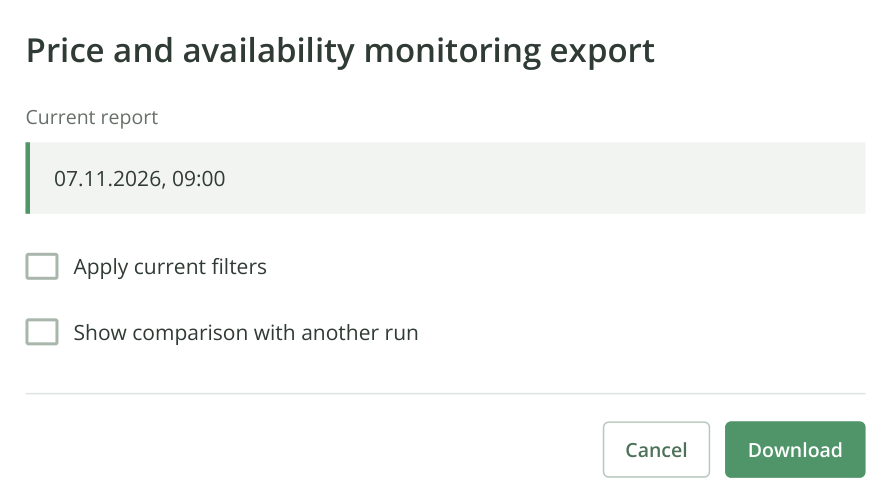
16. A one-off product export: the completed run is selected and comparison is off. The renamed “Product Description” field appears in XLSX with the other data.
What to deliver: XLSX containing source URLs, collection date and populated fields. Explain which description block and price you collected. Leave missing values empty and explain why; do not substitute a neighboring configuration's price. Names and SKUs help the client match rows to their catalog.
A one-off collection does not need a schedule. If the buyer wants regular price and availability updates, offer another package with an agreed duration and frequency. See the detailed field selection, URL and scheduling walkthrough. You can separately offer to adapt the collected descriptions in AI writer for publication under the client's brand.