
 English
expand_more
 Español
 Deutsch
 Français
 Português
 Türkçe
 Polski
 العربية
 हिन्दी

How to build a combined SEO and AI search action plan in Labrika
Choose a service you want to win customers for, then combine your SEO audit, GEO audit and AI response checks into one action plan. Labrika reveals technical barriers, missing company information, competitors and placement opportunities. Here is how to turn those findings into tasks for developers, writers and marketers, and verify the completed work.
Choose the service you want to sell
Suppose North Coffee sells coffee machines and is launching office rentals in Seattle. In organic search, it needs to promote its rental landing page. In AI answers, it wants to appear among suppliers offering installation, maintenance and replacement machines. This is one commercial goal that requires a working website, clear terms and supporting information beyond the company's own site.
For an online store, the focus might be a new category; for a B2B company, a particular industry use case; for a chain, a new branch's services. Start with demand you can already serve: you have a product, clear terms and a way to accept orders.
Add one sentence to your project task: “Generate enquiries for coffee machine rental for Seattle offices with 20–100 employees.” Include the landing page URL and direct competitors. This helps you select topics and websites: an article about home coffee makers should not become a priority just because it has higher search volume.
Starting with commercial use cases, then establishing a baseline and identifying specific gaps follows Aleyda Solis's approach to AI search optimization. In Labrika, you can follow this sequence using related reports and a task board.
Connect customer questions to keywords and pages
Use questions from customer enquiries: how much rentals cost, what maintenance includes and what happens if a machine breaks down. Add search terms in the website settings and specify your location, search engine and device. After a full analysis, open “SEO” → “Optimization and KW grouping”: Labrika groups keywords that belong on the same landing page. Use “Edit URL” to assign an existing or planned URL to a group.
| Buyer's decision | Search term and prompt to check | Page |
|---|---|---|
| Choose a supplier | “office coffee machine rental” “Where can I rent an office coffee machine in Seattle with maintenance included?” |
/rental/: terms and enquiry form. |
| Compare renting with buying | “rent or buy a coffee machine” “For a 50-person office, is it cheaper to buy a coffee machine or rent one?” |
A cost comparison using the same assumptions. |
| Assess downtime risk | “coffee machine rental with replacement” “Which suppliers provide a replacement coffee machine during repairs?” |
Maintenance terms on the rental page. |
This table is a planning example, not a separate product report. You do not need a page for every wording variation: technician visits, repairs and replacement machines can be covered in one service section. A separate comparison page makes sense when it supports a distinct buying decision.
For questions to AI assistants, open the “Brand visibility in AI” settings. Under “Queries (prompts) for checking”, click “Suggest”, describe the company, its customers and the service, then generate suggestions. Select relevant questions, click “Add” with the selected row count, and choose “Apply” in the next step. If you have already run a GEO audit, you can also use questions from “AI Audit” → “Prompt ideas”.
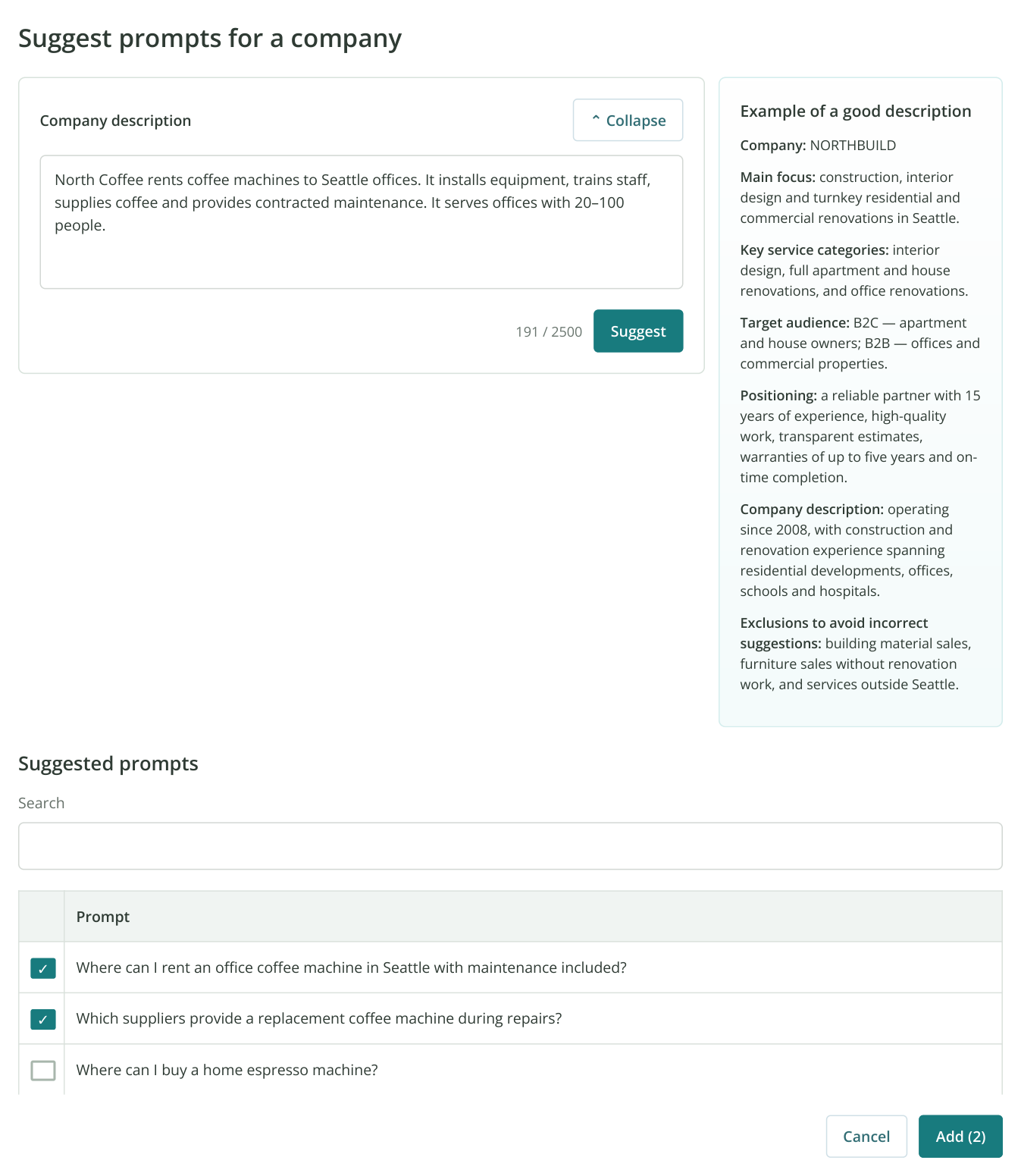
1. The prompt suggestion window: your company description is on the left, an example on the right and suggested questions below. Two office rental questions are selected. “Add (2)” opens the list for review before you apply it. The data is illustrative.
Include unbranded questions to test supplier recommendations and a few branded questions to check factual accuracy. For example, “What services does North Coffee offer offices?” serves a different purpose from “Who should I choose for coffee machine rental?” Use tags to keep these groups separate when comparing results.
Record your starting point before making changes
Run a full SEO analysis and GEO audit for the selected website. Then save your AI visibility settings, select the assistants you need and click “Run Analysis”. Review the scope and cost in the confirmation dialog. For ongoing work, set a schedule: see the weekly checking example.
In “Brand visibility by queries (prompts)”, open saved answers using the icon next to a result. Record the date, selected models and main gap in your project task. For example: “Competitors are recommended for rental questions; North Coffee is described only as a retailer.” Add a link to the report.
Before publishing changes, enable change monitoring for the relevant pages, saving their text and screenshots. This will show when the rental terms appeared and exactly what changed. It is particularly useful with contractors: you can compare the dates they report with the actual publication history.
Turn each report into a specific action
Start with your chosen landing page. In “SEO” → “Technical audit”, review 4xx/5xx errors, redirects and canonicals. Use “Pages with broken links” to find pages with broken links to the service. For a JavaScript website, check the content with JavaScript rendering enabled and separately confirm that essential terms are available in the source HTML. A successful rendered crawl alone does not establish that every AI crawler will receive the same text.
Accessibility, page structure and internal links remain part of AI search optimization, as discussed in iPullRank's guide to the technical foundations of AI search. For your service, this translates into a concrete task: restore the relevant URL and access to its content.
| Finding in Labrika | Task to assign | How to verify completion |
|---|---|---|
“5xx errors”: /rental/ is unavailable |
Ask the developer to restore the page and test the enquiry flow. | Repeat the audit: the URL is no longer listed as an error, and the page and form work. |
| “What will AI tell?”: the company is known only as a retailer | Ask the marketer to describe the rental service clearly on the service page and in company information. | Published terms, followed by another check of how AI answers describe the brand. |
| “Who is shown and why”: competitors are associated with maintenance | Compare their terms with yours. If you offer maintenance, explain its scope, service area and replacement arrangements. | The website provides this information, and it matches the current offer. |
| “Important content for AI” and “Content Ideas”: renting versus buying is not covered | Ask the writer to prepare a comparison for an office with a specified usage level. | The calculations use consistent assumptions and link to the relevant offer. |
| An AI answer cites an industry roundup featuring competitors | Ask the marketer to review its selection criteria and offer the publisher relevant information about your company. | The publisher's response and, if included, the updated article URL. |
| SERM → “Description mismatches”: a directory lists outdated terms | Ask the person responsible for listings to update the service and contact details. | A direct link to the corrected listing and another check of the information. |
A GEO audit recommendation suggests a direction; a saved answer shows a particular check result. If the report recommends adding maintenance details that are already on the site, first examine their accessibility and the answer's sources. There is no need to duplicate an existing page with another article.
Improve pages that help buyers choose a supplier
In “AI Audit”, open “How to improve visibility”, “Important content for AI” and “Content Ideas”. For each useful idea, decide whether to improve an existing URL or create a separate page. Check your keyword groups so that a new article does not compete with an already suitable landing page.
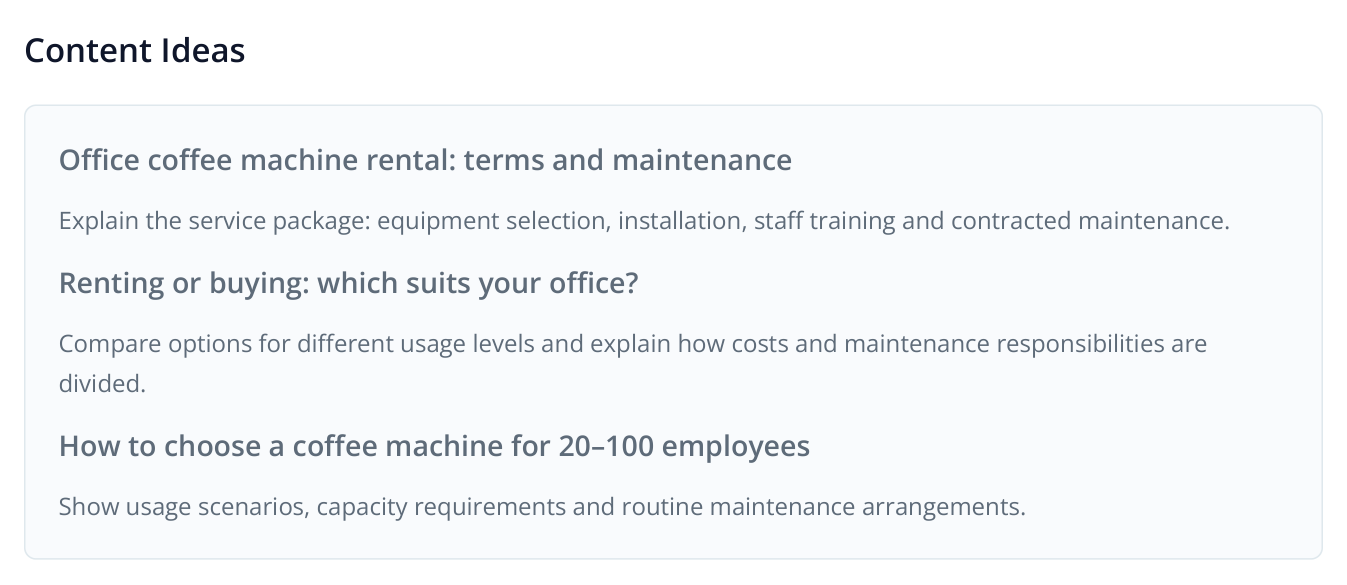
2. Example content ideas from the report: each addresses a different buying decision and could become a separate page.
For rentals, start with the details buyers need: supported usage, minimum term, what the fee includes, who maintains the equipment, the service area and replacement arrangements. Instead of “We provide excellent service”, explain: “Rental includes installation and staff training. Maintenance is provided under the service agreement. A replacement machine is supplied during repairs.” Use your actual response times, coverage and terms in the published version.
For a rental-versus-purchase comparison, use one scenario: a 50-person office, the same number of cups and the same calculation period. Include equipment, consumables and maintenance for both options. This helps a buyer decide and provides specific information for an AI answer. Aleyda Solis's content prioritization framework assesses such content by its decision-making value, business relevance and original data.
Labrika speeds up preparation: “Competitors’ Content” helps find related content, “Expert article” creates a detailed guide, and “Content Factory” prepares a coordinated series. Improve an existing page through “Optimization and KW grouping” → “Content Optimizer” → “Optimization in 1 click”: AI inserts missing keyword phrases into the current text. See the before-and-after example.
Place official terms in readable text alongside the offer. Prices and restrictions shown only in an image or an outdated file are harder to use in comparisons. Clear, current facts are also part of Ahrefs' recommendations for AI search content.
Find external evidence for your service
Open an answer that recommends a competitor and follow its cited sources. Suppose the assistant cites an office rental roundup. Check the selection criteria, publication date and author. If your offer fits, send the publisher comparable terms and suggest considering your company when the article is updated.
In “AI Audit” → “Registration Directories”, select platforms relevant to your category. In SERM → “Platforms”, review the listings and publications already found. Separate SERM analyses for two or three competitors can reveal more directories and roundups. Follow the guide to finding platforms and authors and exporting XLSX.
Start with a few specific opportunities: update an outdated listing, add the rental service to an industry directory, and send your terms to the author of a relevant roundup. Define the deliverable in each task: a published listing, corrected information or editorial consideration. Mass registration without checking the audience wastes your team's time.
Your own website and external evidence complement each other in Ahrefs' strategy. When selecting a source, consider its connection to the buying decision and the lasting value of the placement, as discussed in Aleyda Solis's guide to third-party citations.
Create tasks and assign owners
Click “Tasks” in the left-hand navigation, then go to “Boards” → “+ Create a board” and choose “Generate a board based on a website analysis”. Name the board and click “Create”. The SEO audit tasks will already be prioritized.
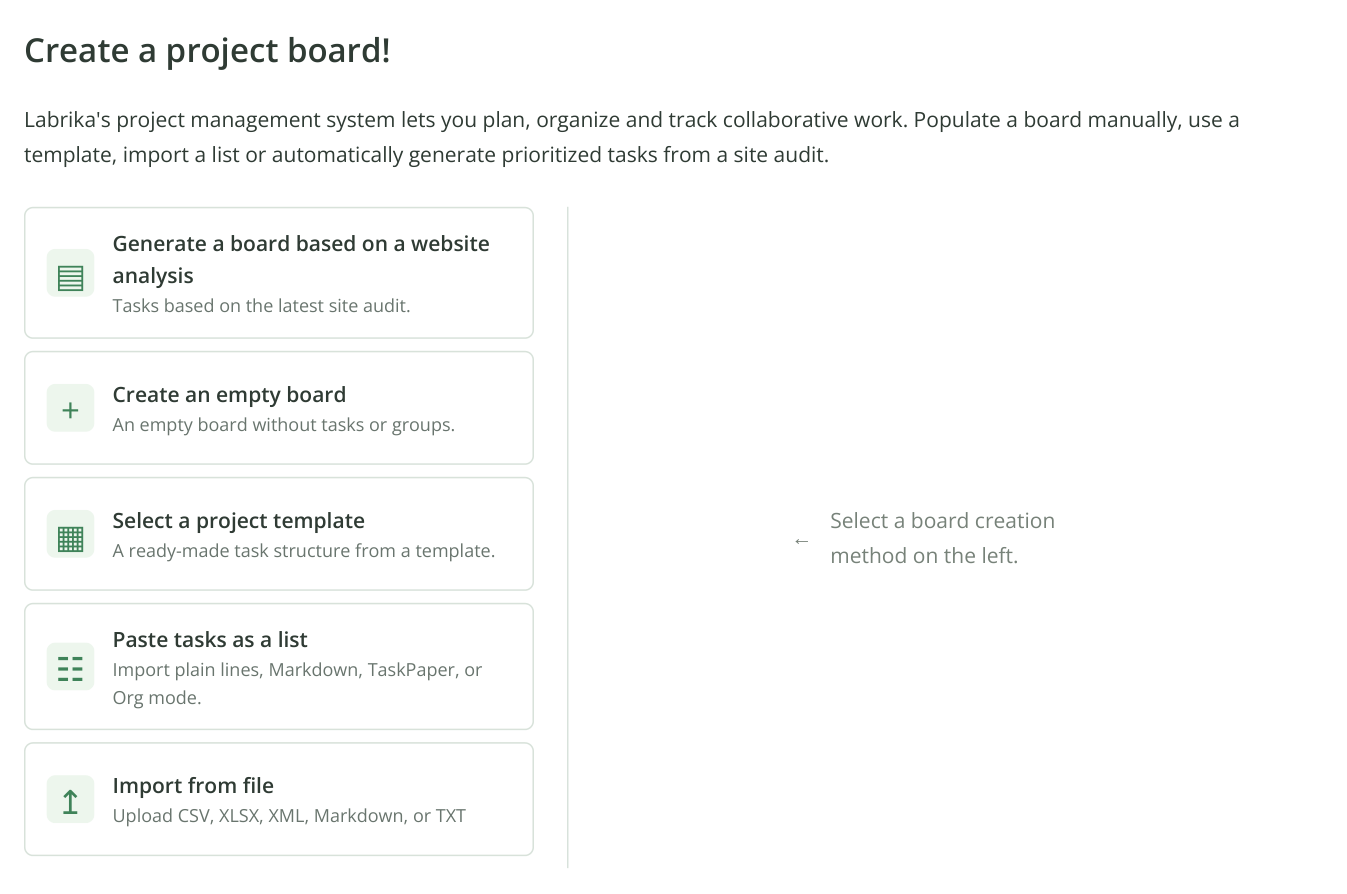
3. Part of the board creation screen: the methods appear on the left, and the selected workflow opens on the right. Click “Generate a board based on a website analysis”, then enter the board name in the dialog.
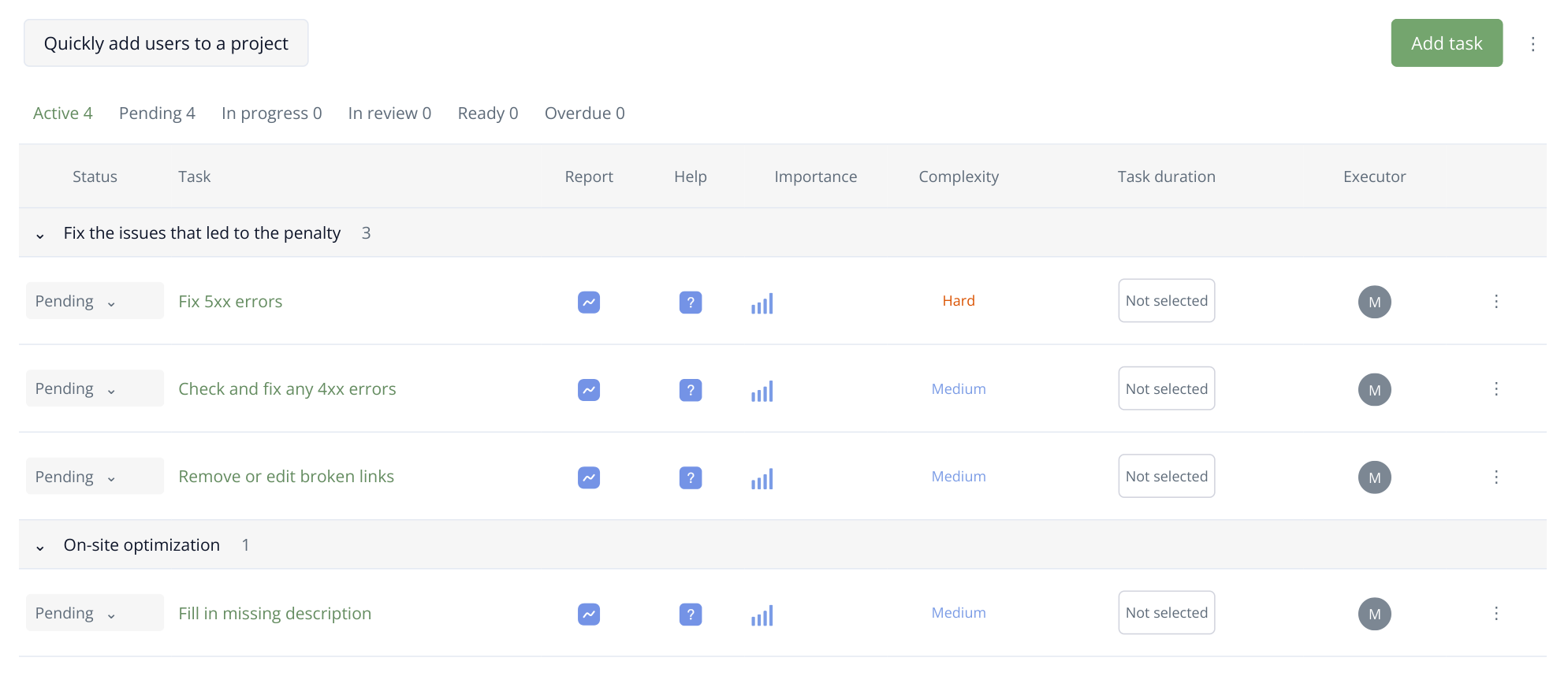
4. Part of a generated plan with illustrative store tasks. The generation process sets their priority order; each row links to its report, help and task. The team assigns deadlines after creating the plan.
Add the selected GEO work to this plan using “Add task”. Create one card for each publication or fix and attach findings from both audits. The shared technical and content foundations of SEO and GEO are discussed in Ryan Law's article; in practice, combining them helps avoid paying twice for the same improvement.
Add office maintenance terms to /rental/: service area, included work, replacement process and response times. Reason: “What will AI tell?” describes the brand only as a retailer, while competitors appear for the rental-with-maintenance prompt. Use the company's current contract as the source. Deliverable: the published page containing these details, with its URL attached to the task.
Invite colleagues through “Members”. They receive an invitation at the specified email address, accept it and open the project they have access to. “Specialist” suits a colleague who creates tasks; “Executor” suits someone carrying out assigned work. See the roles and invitation process. Set the owner and deadline in the task card, discuss the work in its chat and attach files there.
| First-month stage | Work | Expected deliverable |
|---|---|---|
| Week one | Baseline checks, landing page availability and obvious corrections to company information. | Saved results and a working service page. |
| Week two | Service terms, an options comparison and an internal link to the landing page. | Published pages that answer specific customer questions. |
| Week three | Listing updates and outreach to selected directories and authors. | Links to placements and a record of publisher correspondence. |
| Week four | Repeat checks and review answers to the original prompts. | A decision to continue the work, refine it or address the next gap. |
This is an example work schedule, not a deadline for appearing in AI recommendations. Kanban shows work in progress and awaiting review; the Gantt chart helps connect preparation, development and publication. While a developer restores a page, a writer can prepare copy and a marketer can select placement opportunities.
Verify the work and choose your next step
After publication, repeat the SEO analysis and open “Comparison Reports”. Check whether the selected errors were fixed, then review the page text and screenshots in change monitoring. Compare rankings for the original keyword group using the same location and device.
In AI visibility, use the same brand, assistant, tags and question set. Review several runs and open answers for rows whose results changed. The positions below are illustrative: they show where to find the answer, not proof of increased sales.
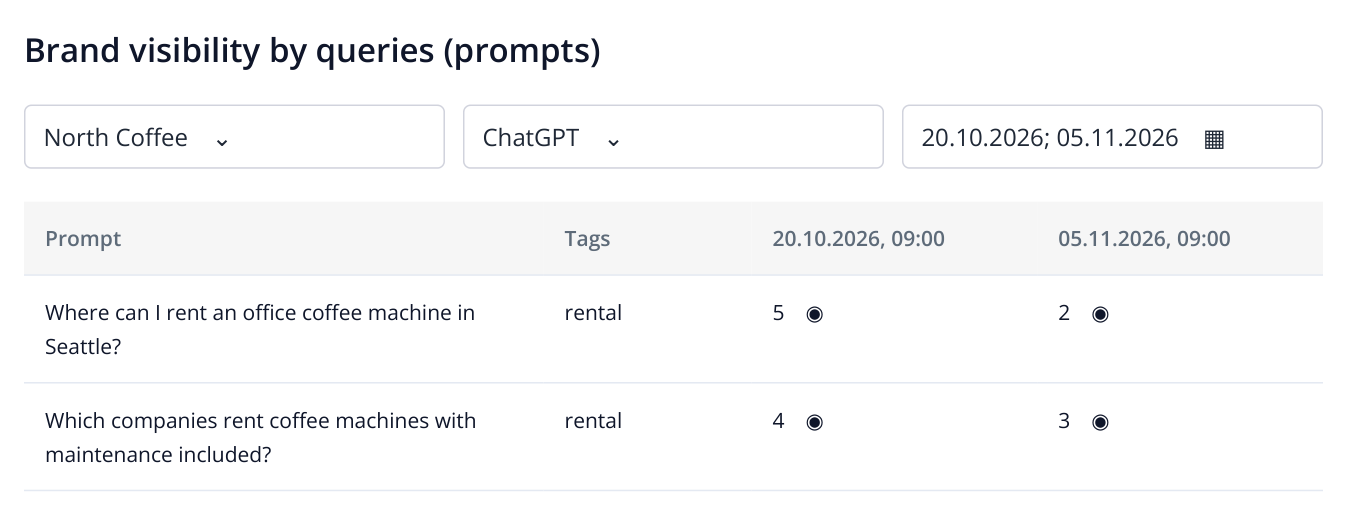
5. Example brand history in ChatGPT: the columns represent check dates. Assess positions together with the saved answers.
Review three outcomes separately: whether the brand appears in supplier recommendations, whether rental and maintenance are described accurately, and whether the answers cite relevant sources. Then compare the period with enquiries in your analytics and CRM. An unlinked mention can introduce someone to the brand, but it is not automatically a visit or a lead.
To test your first hypothesis, avoid changing every topic and prompt at once. For example, update one service's terms, record the date and monitor its question group. On a larger project, keep a comparable group of pages unchanged as a reference. This approach to evaluating changes is discussed by Seer specialists.
Let the answers guide your next step. If the model still describes an old service, review its current sources and outdated listings. If the facts are correct but competitors are recommended, examine the terms and supporting evidence highlighted for them. If recommendations and visits increase but enquiries remain low, review the offer and conversion path on the landing page. Each stage then starts with an observed problem, and completed work stays connected to its results in Labrika.