
 English
expand_more
 Español
 Deutsch
 Français
 Português
 Türkçe
 Polski
 العربية
 हिन्दी

How to find relevant brand placements with GEO audits and SERM
Labrika helps you find places to create company listings, update outdated information and participate in industry reviews. “Registration Directories” in the AI audit suggests platforms, while SERM shows discovered brand pages, reviews and conflicting descriptions. Use the findings to choose placements for a particular service, give the team specific assignments and verify the results.
Start with the service and customers you want to reach
Suppose North Coffee sells coffee machines and launches office rentals in a new city. Older directories may still describe it only as a store, while rental roundups list other suppliers. The marketer needs to find those gaps and publish information that helps buyers choose rental with maintenance.
Choose one focus for the initial review: a new service, branch, product or customer segment. This makes platform selection concrete:
| Situation | What to find in Labrika | How to use it |
|---|---|---|
| Opening a branch | Local directories from the AI audit; discovered listings and locations in SERM | Create a branch listing with its address and services; correct information belonging to the old office. |
| Adding a service | Specialist platforms and existing company descriptions | Add rentals alongside equipment sales and find reviews of suppliers offering that service. |
| Promoting a B2B product | Industry directories, solution comparisons and competitor mentions | Present the product where buyers choose a solution for a particular need, such as a CRM for field service. |
| Managing an agency client | Platform suggestions and discovered mentions by analysis date | Agree on placements and corrections, then give the client direct links to the completed work. |
For an online store, look specifically for discussions of the retailer: shipping, warranties, returns and service. The popularity of a product brand you sell does not measure your store's presence.
Get suggestions from Registration Directories
Open “AI Audit” → “Registration Directories” in the website project. If you have not run the analysis, follow the GEO audit guide. The “Website” column contains suggested platform URLs. Use the search above the table to find a domain in a long list.
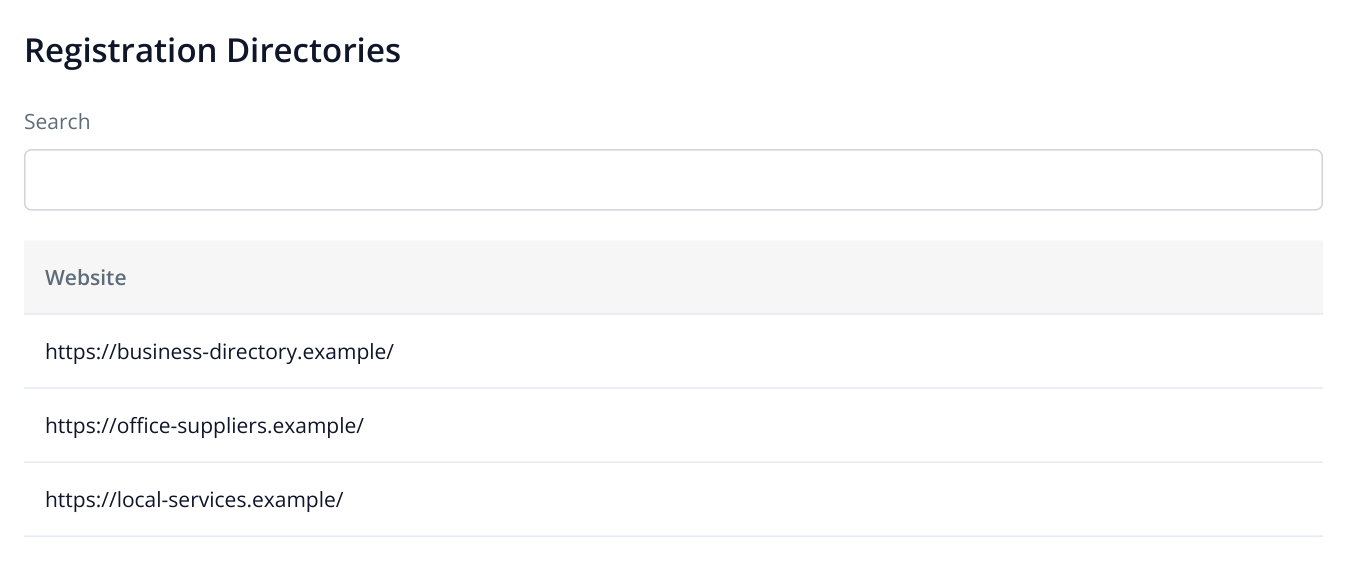
1. The report lists suggested platform URLs. These are fictional domains; your project shows your audit's findings.
Open a candidate and check three things: your category, target region and whether it allows information about the specific service. For North Coffee, an office equipment supplier directory fits rentals; a coffee shop directory serves a different audience. For a CRM, a service-business category is more useful than an undifferentiated software list.
Inspect an existing listing. Can it show the official website, services, coverage and maintenance terms? A platform that publishes only a name and phone number serves a narrower purpose than one with detailed descriptions and offer comparisons.
Check whether your company already has a listing. Search by name and domain. If it exists, request access or submit corrections through the platform. When a phone number or website changes, updating an established listing with review history is more useful than creating a duplicate.
Collect candidates from several sources
One source provides only part of the picture. Combine GEO audit suggestions with discovered publications and links from AI answers. This gives you new registration opportunities and specific reviews already comparing your competitors.
| Where to look | How to find candidates | Purpose |
|---|---|---|
| «AI Audit» → «Registration Directories» | Review suggested websites and select relevant categories and regions. | Create or expand a company, branch or product listing. |
| SERM → “Platforms” for your brand | Click a domain's “Pages” count and open the discovered URLs. | Update existing listings, find mentions of a new service and correct outdated information. |
| SERM for a competitor | Create a separate project for its brand, run the analysis and inspect “Platforms” and “Ratings in Google Top 20”. | Find directories and roundups your company has not yet joined. |
| «Brand visibility by queries (prompts)» | For a buyer question, use the icon beside the result to open the saved response. Follow sources cited in the answer. | Suggest an update to a review the assistant already cites for that buying decision. |
| SERM → “Authors” and the original publications | Open materials through an author's review count. For a relevant editorial article, inspect the byline and the author's other work on the original website. | Find a specialist for product testing, an interview or a future industry review. |
An office rental supplier might find three distinct opportunities: a supplier directory for office managers, a “Coffee machines for a 50-person office” review and an author who tests equipment in workplaces. The directory needs company details and service terms; the review needs comparable specifications; the test needs access to equipment. The same promotional copy will not meet all three needs.
Find existing listings, reviews and mentions with SERM
In SERM, open the website project. For a new project, enter the brand, official domain, country and analysis language. Add genuine name variants, such as “North Coffee” and “NorthCoffee”. Describe the services, customers and coverage: “North Coffee sells and rents coffee machines to Seattle offices with 20–100 employees. It installs equipment, trains staff and provides contracted maintenance, with a replacement machine during repairs.” Save and start the analysis. If the report is ready, go straight to the discovered materials.
Open “Platforms”, select the required “Analysis date” and find a domain using the table search. Click its “Pages” count. A panel on the right lists the platform's discovered URLs, linking to individual listings or publications.
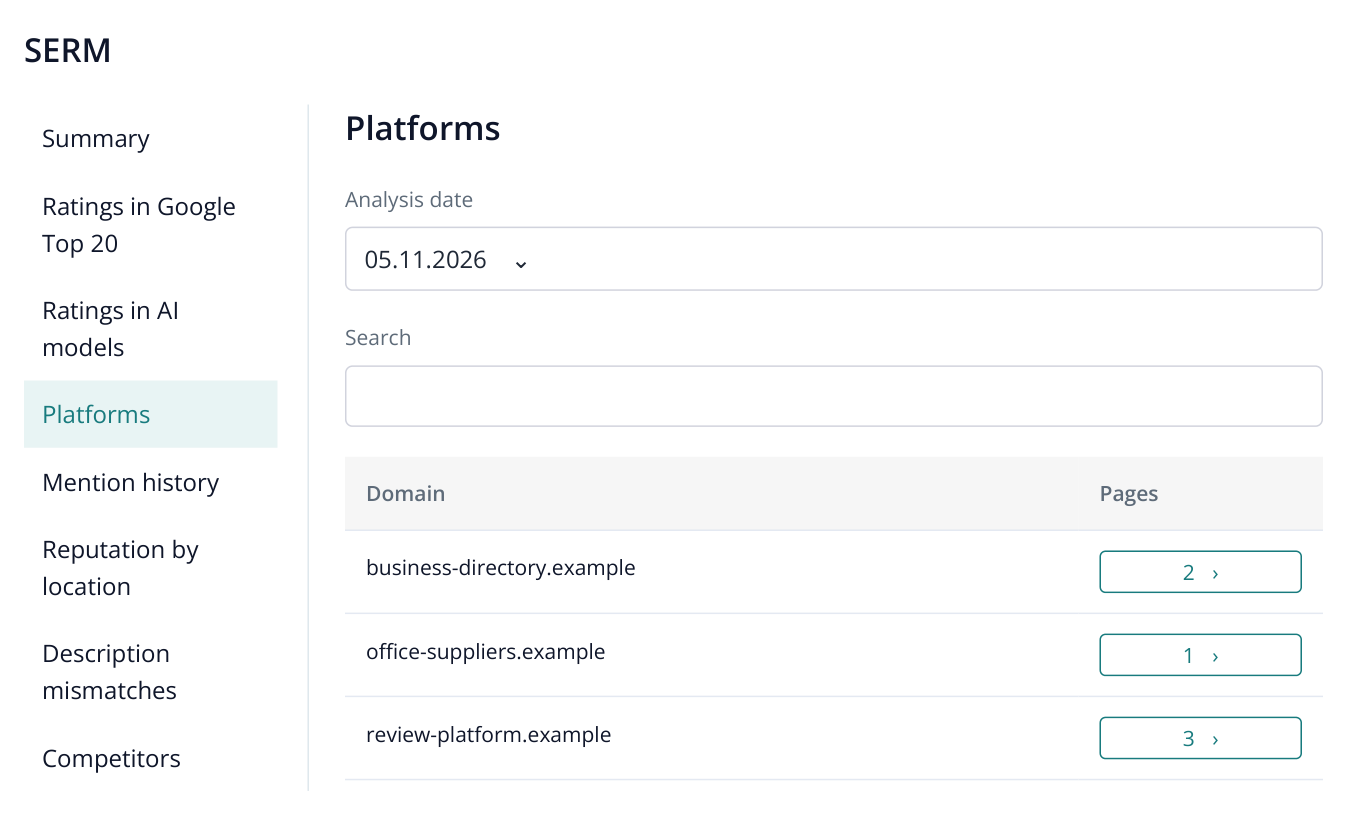
2. A “Platforms” excerpt: the “Pages” count opens the selected domain's URL list on the right. Three discovered pages may belong to a single company listing. The data is illustrative.
For example, review-platform.example has three discovered pages: one company listing and two reviews. The work concerns that listing and those reviews, not three new profiles. A page on office-suppliers.example may instead be a supplier roundup, requiring an editorial inquiry rather than a registration form.
Other reports help you choose the next action:
| SERM report | What to inspect | How to use the finding |
|---|---|---|
| “Mention history” | The full text of a specific item or review and its source | Investigate a service complaint, respond to the customer or clarify a listing. |
| “Ratings in Google Top 20” | The query, discovered page and search result context | Start with listings and reviews already appearing in brand searches. |
| “Ratings in AI models” | The saved answer and any links it contains | Identify a publication describing the company and decide whether an update or addition would help. |
| «Competitors» | Mentioned companies, text excerpts and related sources | Find comparisons and industry reviews worth investigating for possible inclusion. |
| “Description mismatches” | Conflicting descriptions and contact details | Find an outdated phone number, address or website, or inaccurate service information. |
| “Reputation by location” | Locations associated with the discovered platforms | Review branch presence and investigate a new city separately. |
Before approaching a review featuring competitors, read it: do the service, city and audience match? An article about home coffee makers is not a fit for office rentals. For a business supplier roundup, prepare rental, maintenance and replacement-machine facts that help the editor compare your offer.
Research competitors and reviews you could join
Choose two or three competitors buyers would seriously consider instead of you. For Seattle rentals, these are rental suppliers with maintenance, not just any large coffee machine store. Find them in AI visibility through unbranded questions, or in the GEO audit under “Competitors” and “Who is shown and why”.
- Create a separate SERM project for each competitor. Enter its brand, domain, country, language and name variants, and specify the relevant service in the description. Run the analysis. Do not mix your brand and a competitor's name as variants of the same company.
- Open “Platforms” and choose the analysis date. Use “Pages” to inspect a domain's URLs. Select reviews, directories and comparisons relevant to your service.
- Open “Ratings in Google Top 20” to see queries and discovered pages. Look for roundups such as “best suppliers”, “alternatives” and “comparison”. Read the article itself: a competitor mention alone does not establish relevance to your business.
- For a review, record its URL, author, update date, comparison criteria and editorial contact method. Find the byline on the original page; “Authors” also helps investigate discovered reviews and their sources.
- Tailor your proposal to the publication. For a rental comparison, provide costs at a specified usage level, maintenance coverage, service area and replacement terms. For an equipment review, provide the model, specifications and an offer to supply a test unit.
Example message to an author: “Your office rental comparison for teams of 30–50 includes several suppliers with maintenance. We have an offer for the same audience. We can send costs for your calculation scenario, service coverage and replacement terms so you can assess it for your next update.” This helps the editor compare offers using their own criteria.
The same research supports other goals. A manufacturer can find reviewers and trade publications for a new model. A SaaS company can find integration directories and industry-specific comparisons. A local business can find regional roundups featuring nearby competitors. An agency can propose specific placements and explain which audience and buying question each addresses.
If a platform appears across several competitor projects, review it early. That is a useful selection signal, but decide based on the content: audience, freshness and a valid reason to include your offer. The platform owner or editorial team decides whether to publish it.
Fix information that costs you inquiries
In “Description mismatches”, review the discovered page, explanation of the discrepancy and quoted information. Open the source and compare it with current company details. Start with issues that prevent contact: a dead phone number, old domain, wrong address or incorrect opening hours.
For North Coffee, “equipment sales only” is a significant problem if it already offers rentals. A visitor cannot discover the relevant service from that listing. Update the description, specify the service area and add a direct rental-page link if the platform allows it.
Different addresses are not always errors: the company may have several branches. Match each listing to its location instead of changing every address to the head office.
If the issue appears in a review, read it in full under “Mention history” and visit the platform to respond. “It is unclear who maintains the machine” suggests information to add to the listing. An actual repair delay requires action from the service team and a response to the customer.
Decide what to address first
Group discovered URLs by the action needed. This gives the team a clear scope and avoids spending money on duplicate registrations.
| Finding | Action | Why prioritize it |
|---|---|---|
| An existing listing with an old phone number | Recover access and replace the contact details | Customers can already find the company, but their inquiries do not reach it. |
| A listing with reviews that omits the new service | Add rental and maintenance information | The page already has company coverage; it needs the current offer. |
| A relevant AI audit directory with no brand listing | Create a listing in the appropriate category and city | It gives the right audience another place to discover the company. |
| A supplier review featuring direct competitors | Ask about inclusion and supply facts to the editor | The platform helps buyers compare providers of your service. |
For paid placements, first establish what the fee includes: a listing, review inclusion, impressions or clicks. Assess it against your objective. A new branch needs a local audience; a B2B product needs the right category and space to explain its use case. A domain appearing in a list does not replace that assessment.
Write a listing that helps buyers choose your service
Register and edit directly on the platform. Use one recognizable brand name, the official website and current contact details for the relevant branch. Explain the service, customers, coverage and terms that distinguish the offer.
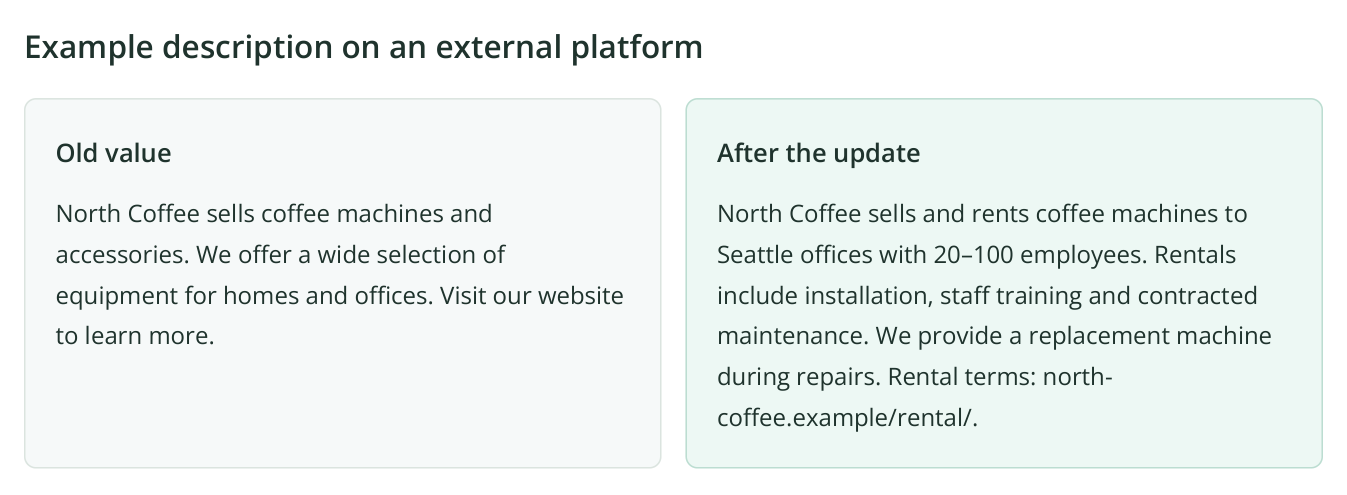
3. An editorial example for a fictional company: the updated description explains rentals, audience, city and maintenance. Use it as a model for an external company listing.
The revised description adds office rentals to equipment sales and shows who the service fits and what maintenance includes. Readers can match the offer to their needs. Include only terms your company actually fulfills.
For a store, product categories, shipping, installation, warranties and returns are more useful than “a large selection”. For software, describe user needs, integrations and deployment options. For a branch, give its address, coverage, hours and booking method.
Keep the facts consistent across your website and external platforms. Adapt the wording to the format: detailed service information in a directory, comparable data for a review and a specific response to a customer complaint.
Export platforms and authors as XLSX
In SERM, open “Platforms” for the relevant brand and select “Analysis date”. Clear the table search and filters for a complete list. For a specific selection, apply the relevant conditions first: the export respects the current search, filters and sorting.
- In the report's right-hand panel, click the download icon with the “Download report” tooltip.
- Choose XLSX from the menu. The file downloads once preparation finishes.
- Export “Authors” in the same way for an author list, or “Description mismatches” when assigning information corrections. Both reports support XLSX too.
- Save separate files for your brand and each competitor, such as
Platforms_Competitor_A_2026-11-07.xlsx. Combine them by domain in your working spreadsheet, retaining a column naming the company researched.
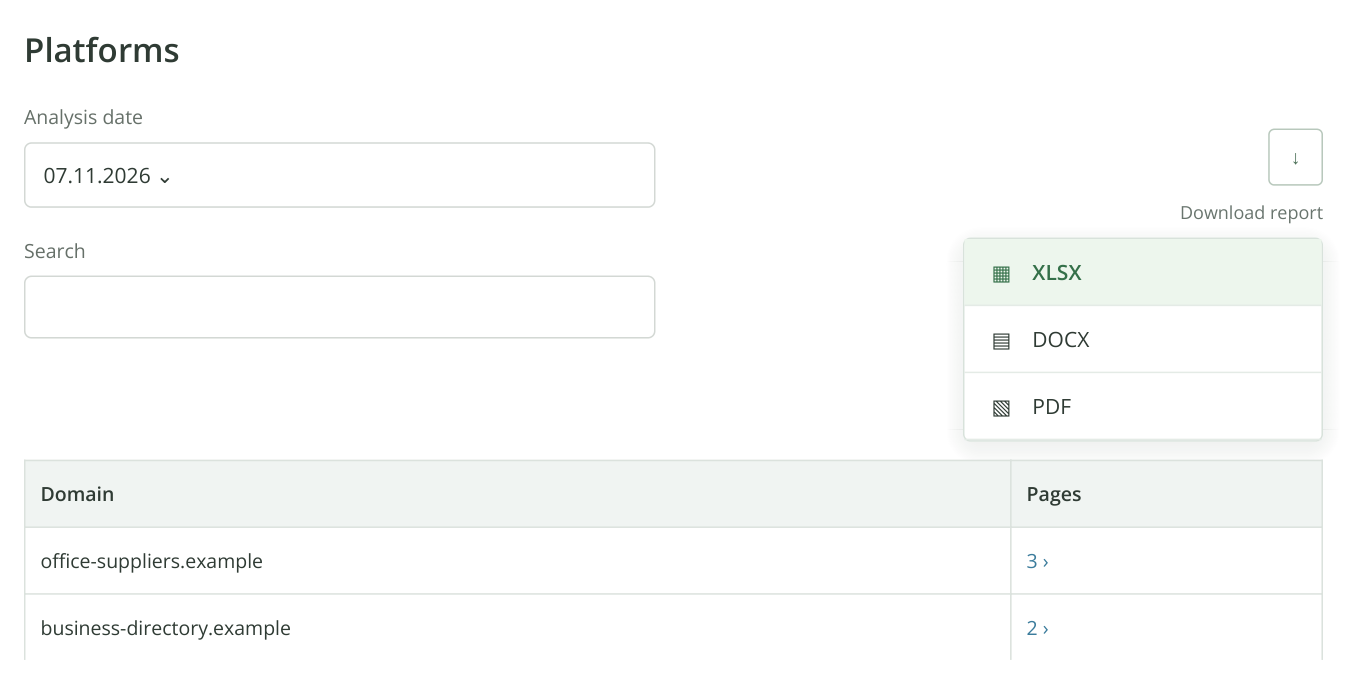
4. A SERM report excerpt with the export menu open. XLSX uses the selected date and table conditions. Clear search and filters before downloading a complete list. Domains and figures are illustrative.
Add your own working columns: “Publication URL”, “Placement purpose”, “Author / editorial team”, “Material to send”, “Responsible”, “Status” and “Published link”. These form your placement plan in Excel. Obtain author contact details from the original platform: a name in the report does not mean an email address was found.
Use “Registration Directories” as another source of candidates. The XLSX workflow above applies to SERM. It lets you give an assignee the discovered platforms and authors with the analysis findings, then add selected GEO audit suggestions to the spreadsheet.
Assign a specific placement
Open “Tasks” in the left sidebar, choose a board and click “Add task” in the task list. Name the platform and action in the title; put the URL, required edits and acceptance evidence in the description. Assign a person and deadline. See the task and discussion guide for details.
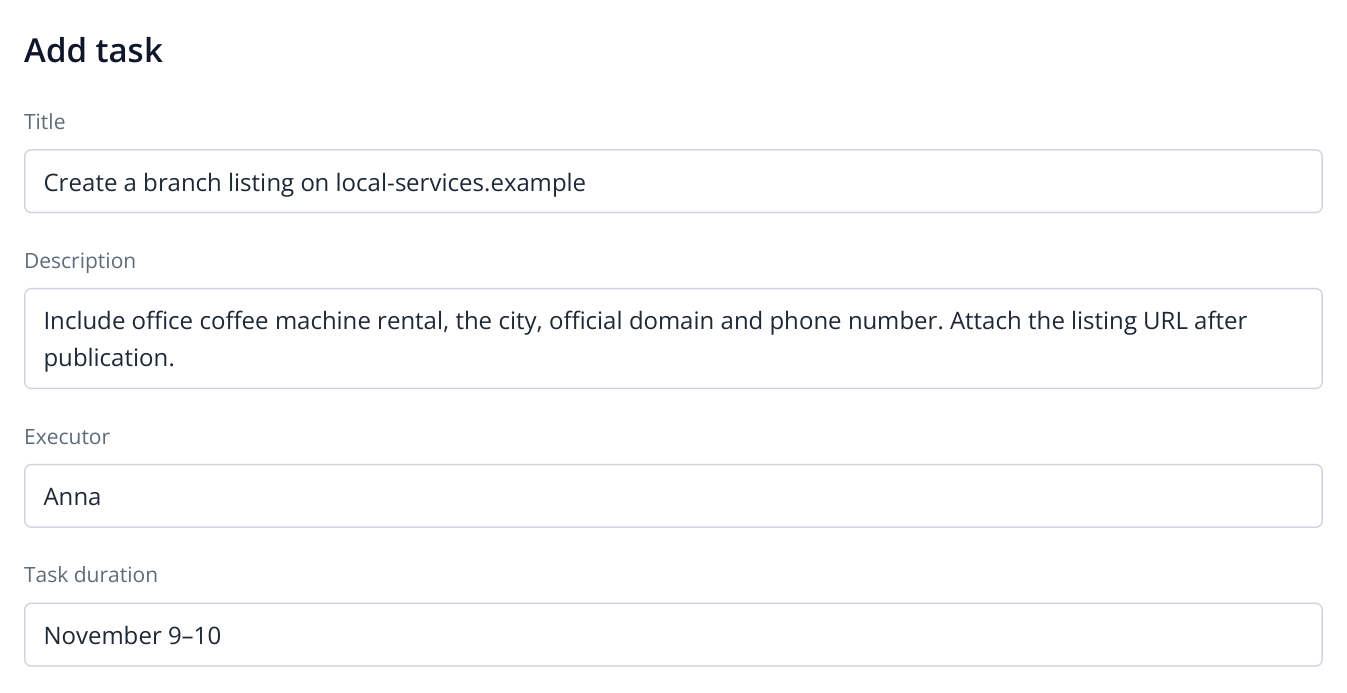
5. One platform, one verifiable assignment. The published listing link provides evidence for acceptance.
For example: “Update business-directory.example with office rentals, maintenance and service coverage. Attach the published listing link.” For an editorial review, the first milestone is different: inclusion terms and the editor's response. A submitted request is not yet a published placement.
Keep copy for approval, files and the finished URL in the task discussion. Agencies can give clients a list showing the platform, change made, date and direct URL. The client can see exactly which information became available and where buyers can find it.
Verify publications and follow AI recommendations
Open the published listing while signed out of the platform. Are the description, contact details and link visible? Confirm that moderation is complete and save the direct URL in the task. For an updated listing, check that the outdated wording was actually replaced.
After the next SERM analysis, find the domain under “Platforms”, open its pages and inspect the item in “Mention history”. Check “Description mismatches” if you corrected company information. The report date must be after publication; an older saved analysis still reflects the previous data.
To assess AI visibility, use service-selection questions such as “Where can I rent an office coffee machine in Seattle with maintenance included?” Save the baseline answers and continue checking the same questions in your chosen assistants. The setup and answer-review guide covers this workflow. Look for brand presence, accurate service descriptions and cited sources.
Report published pages, discovered SERM mentions and AI visibility trends separately. A direct URL confirms a placement even if SERM has not collected it yet. If the brand appears more often in AI answers, compare several runs: one changed answer cannot establish the effect of a particular directory. Measure platform visits and inquiries in web analytics.