
 English
expand_more
 Español
 Deutsch
 Français
 Português
 Türkçe
 Polski
 العربية
 हिन्दी

How to check whether ChatGPT recommends your brand
When a buyer asks ChatGPT to recommend a supplier, you want your brand to appear for the right service with accurate terms. Labrika helps you find those questions, check your brand and competitors, open saved responses and track changes. The AI audit then helps identify pages and company information to improve so your offer is easier to understand.
Check the questions buyers use to choose a supplier
“What do you know about North Coffee?” checks information about a company the user already knows. “Where can I rent an office coffee machine in Seattle with maintenance included?” tests whether the brand appears during supplier selection. If your goal is new inquiries, start with the second type: a customer describes a need without knowing your company name.
This guide uses the fictional supplier North Coffee. It sells equipment but wants to grow office rentals. General brand awareness tells you little about that goal: you need to see whether ChatGPT recommends its rentals, maintenance and replacement machines. The same approach works in other sectors:
| Who benefits | Example buyer question | How to use the result |
|---|---|---|
| Local service provider | Who provides contracted office coffee machine maintenance in Seattle? | Check your local presence and identify the terms highlighted for nearby competitors. |
| Online store | Where can I buy a coffee machine for a 50-person office with installation? | See whether the store is listed among suppliers and associated with the required service as well as the product. |
| B2B software company | Which CRM suits a small service company with field technicians? | Find use cases where other products are suggested and create pages addressing those needs. |
| Agency | A set of questions covering the client's main services | Show baseline responses, plan the work and compare results using the same questions. |
Start with one service line that already generates revenue or is ready to launch. For example, collect 20 distinct questions about office rentals: supplier choice, maintenance, replacement equipment and contract terms. Twenty near-identical rewordings of one question will reveal less.
Add your brand, direct competitors and ChatGPT
Open the AI visibility project list and click “Add project”. Choose an existing website and click “Continue”. If the website is not in your account yet, use “Add a new site”, enter its name and domain, then click “Create project”.
In “Settings” → “My Site”, check the project domain. Add genuine name variants under “Site or brand name variations”, such as North Coffee and NorthCoffee, so both can be counted in responses. Do not add a service name such as “coffee machine rental”: that is not your company's name.
On the “Competitors” tab, add domains and name variants for companies offering the same service to the same audience. For office rentals, a local supplier is a more relevant comparison than a manufacturer of home coffee makers. Under “AI Systems”, select ChatGPT.
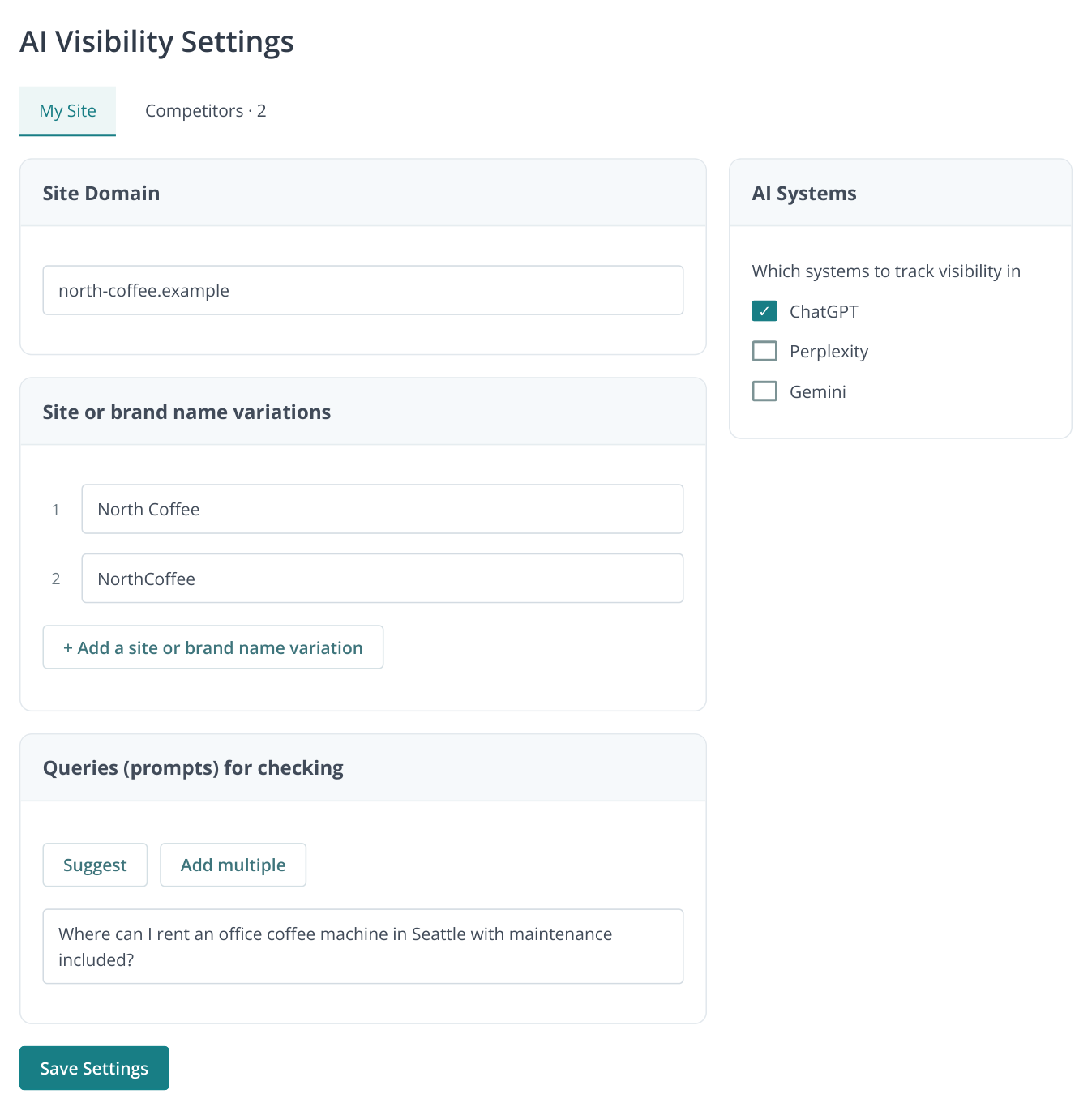
1. Project settings: name variants and prompts on the left, ChatGPT selection on the right. “Suggest” opens prompt suggestions based on your company description. The example data is fictional.
Find prompts in Labrika
In “Queries (prompts) for checking”, click “Suggest”. In “Suggest prompts for a company”, briefly describe your services, customers, location and important terms. For our example:
North Coffee rents coffee machines to Seattle offices with 20–100 employees. It installs equipment, trains staff, supplies coffee and provides contracted maintenance. A replacement machine is provided during repairs. Equipment is not available for private parties.
Click “Suggest”. Select the suggested questions for which you want to attract inquiries. Prompt, intent and tag filters help focus on the relevant service. “Intent” describes the user's goal, such as choosing a supplier, comparing options or learning about a topic.
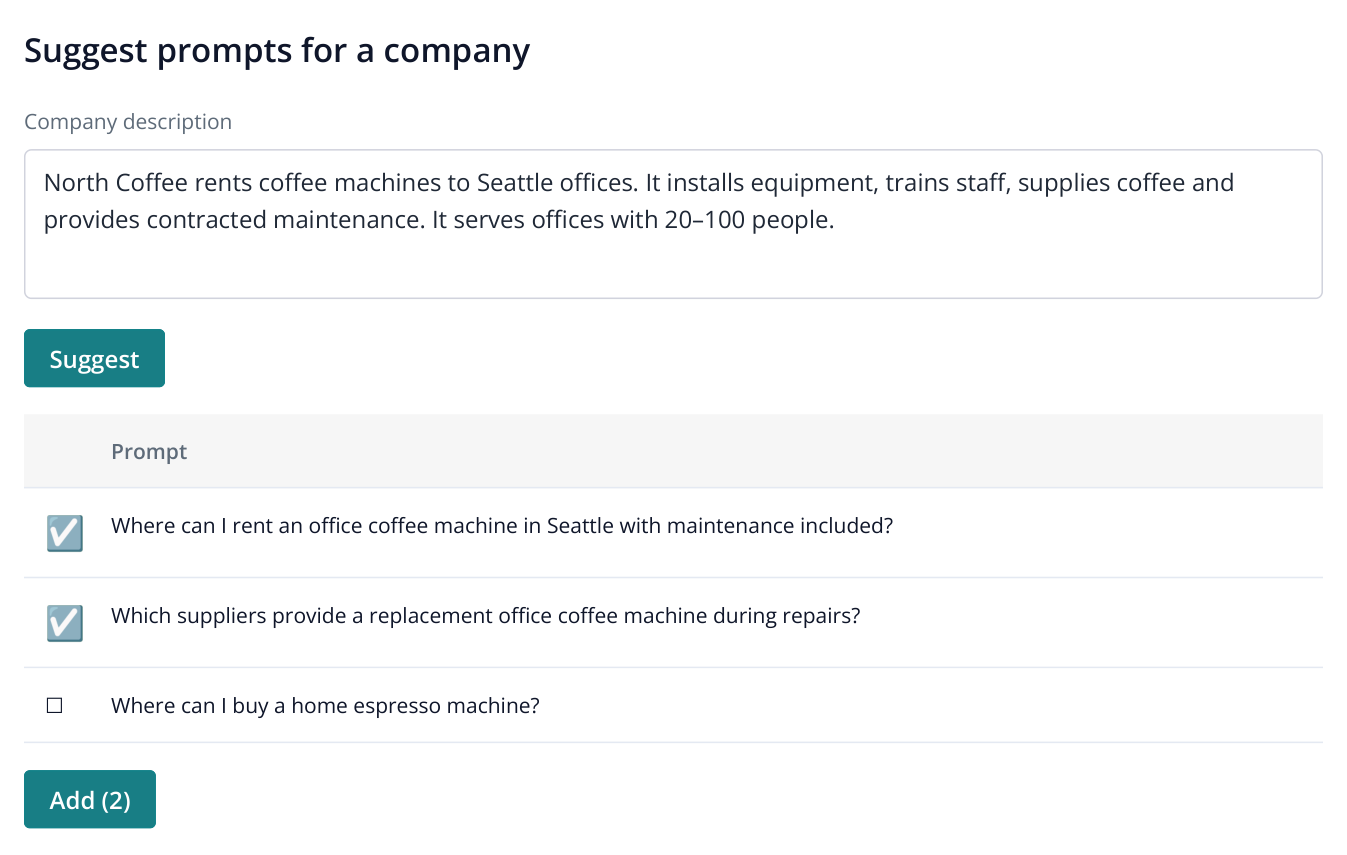
2. Two questions relevant to office rentals are selected. The home purchase question remains unchecked. “Add (2)” takes the selected prompts to the next step.
Click “Add” with the selected-row count, then “Apply” in the add-prompts dialog. Add questions you already hear from customers through “Add multiple”. If sales staff regularly hear “Who will clean and repair the machine?”, include it alongside broader supplier-selection questions.
Include conditions that affect the choice: city, office size, maintenance or integration with another system. Leave your brand name out of supplier-discovery questions. Analyze questions about your company and comparisons with a named competitor separately.
Get more questions from the AI audit
If you have already run an AI audit, open “Prompt ideas”. The report lists “Intent” and “Group” alongside each question. Select suitable rows, click the transfer-to-AI-visibility button above the table and confirm. The visibility settings open with those questions; save them.
This is useful when launching a new service: the audit suggests topics to test, while monitoring records ChatGPT's answers. An equipment supplier can take rental and replacement-machine questions from the audit even if it previously monitored only sales.
Run a check and examine why brands are recommended
Click “Save Settings”, then “Run Analysis”. Confirm the displayed cost for the selected questions and assistants. Once the run finishes, open “Visibility”. On “Brand visibility by queries (prompts)”, select your brand, ChatGPT and the run date.
The number in a prompt row indicates the brand's mention position in the collected answer. The eye icon opens “Responses”, the response saved for that check. Inspect which service is associated with the company and which terms the answer says to clarify. A mention alone does not explain why a buyer should choose you.
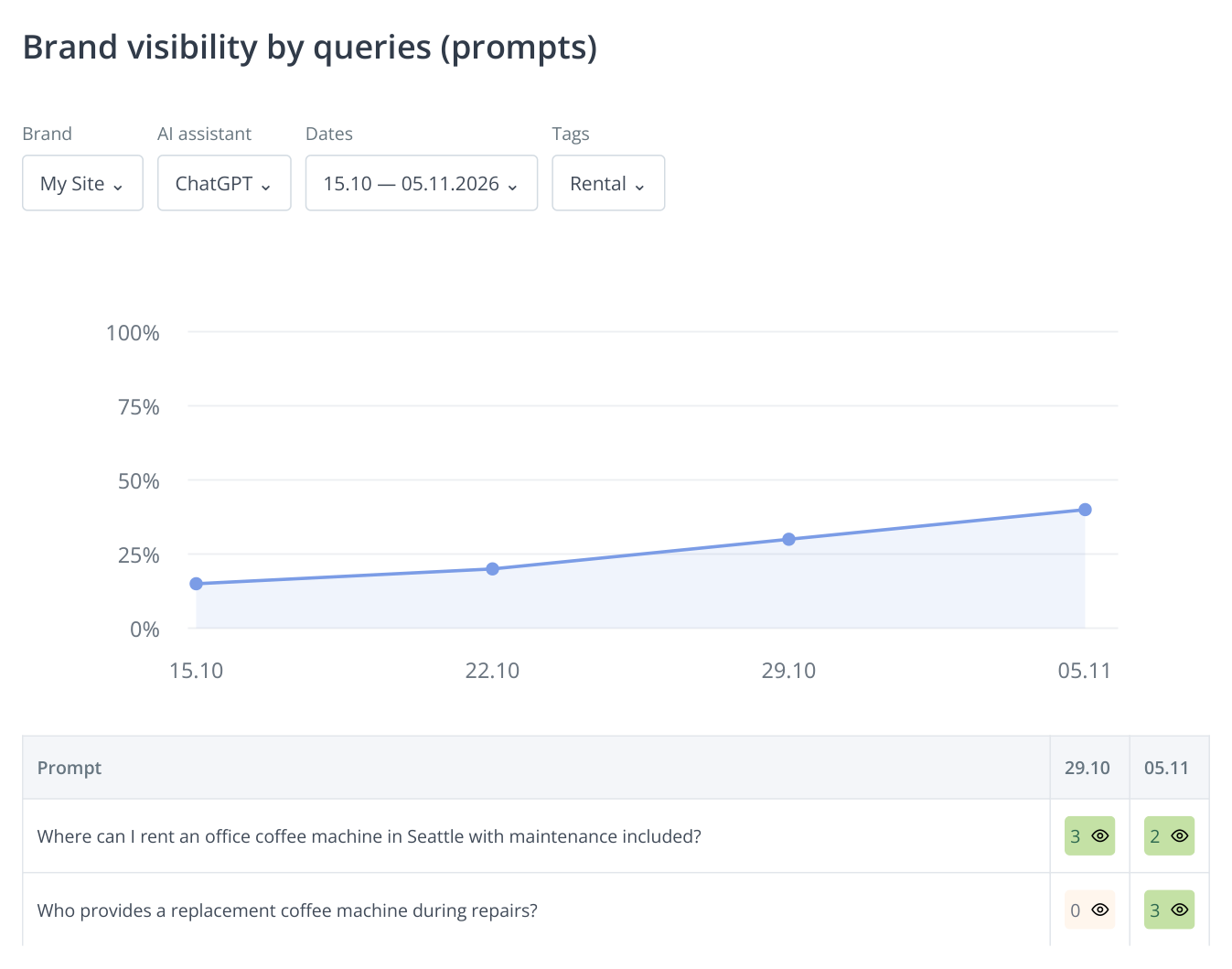
3. A project with four sample runs: visibility rises from 15% to 40% across the same set of 20 questions. The table shows two of them; the eye icon opens the saved response. All figures are illustrative.
The chart above the table shows the share of checked questions whose answers mention the brand. For example, 8 of 20 questions equals 40% visibility. This measures coverage within that service area, while the rows show exactly where the company appears or is absent. To compare a known competitor, switch the brand while keeping ChatGPT, the dates and the question set unchanged.
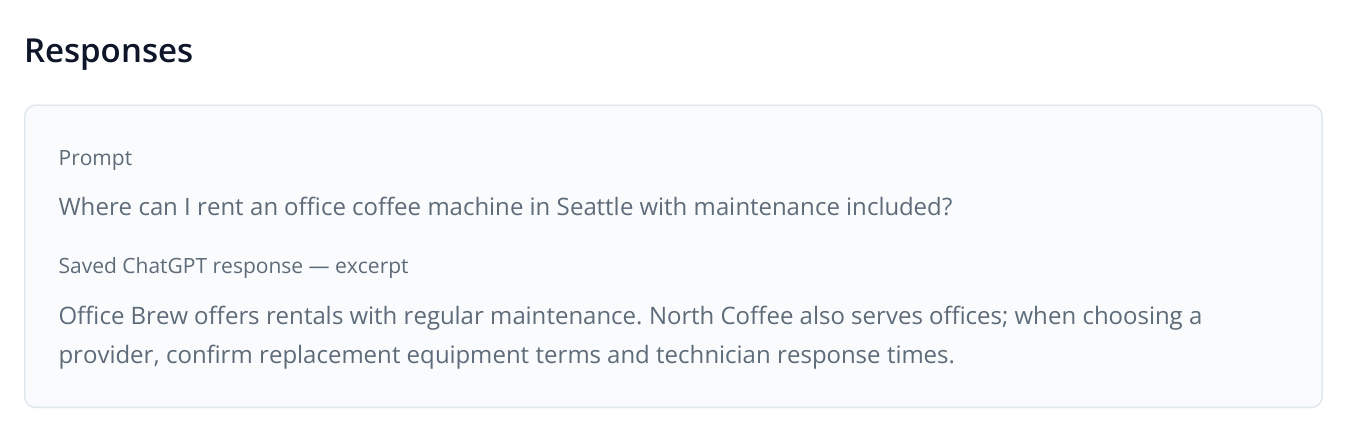
4. A fictional response excerpt: North Coffee is mentioned second, but replacement and service visit terms need clarification. The answer shows which offer details deserve clearer coverage.
In this sample, North Coffee appears second, but replacement equipment and response times remain unclear. If the company already offers these services, the next task is specific: make the terms accessible on the rental page. A general score does not require rewriting the entire website.
If the response mentions your brand but the report does not count it, inspect its spelling. “Brand synonyms” helps you review discovered name variants. Correct them in the settings; see the brand name configuration guide. Recalculation refines mention matching in the responses already collected.
Find companies ChatGPT suggests instead of yours
Open “Brand visibility” and select ChatGPT and the dates. This report shows companies found in responses, including those you have not added to the settings. Horizontal bars compare their presence on the latest selected date; the table below shows mention counts across runs.
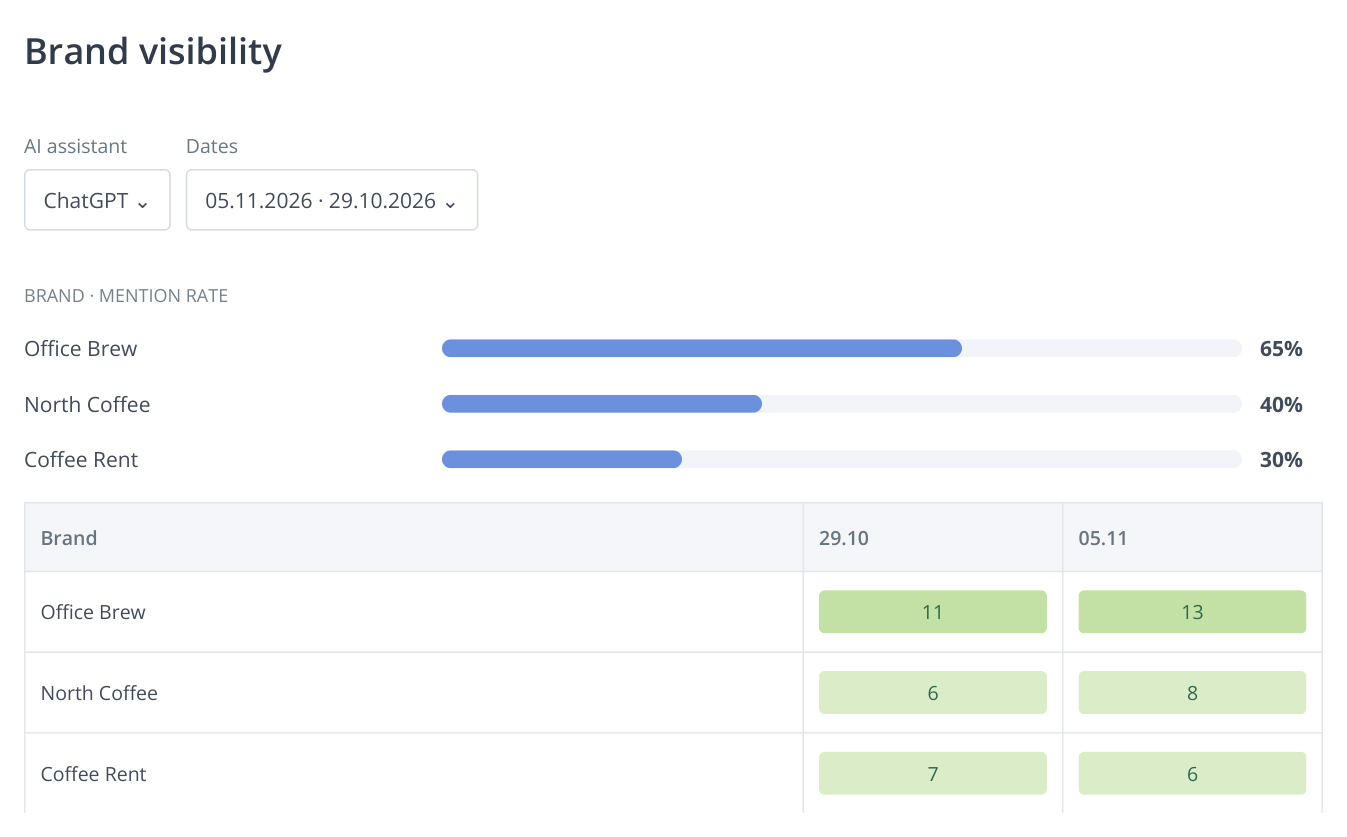
5. The same sample of 20 questions: Office Brew appears in 13 responses and North Coffee in eight. The chart shows percentages for November 5; the table shows mention counts by date. The data is illustrative.
Click Office Brew's mention count in the table to open the question list on the right. Find a relevant question in “Visibility” and open its saved answer with the eye icon. Inspect the terms associated with Office Brew. If its maintenance and replacement equipment policies are explained clearly, compare those details with your own page. Mention counts alone cannot tell you which page to improve.
An unexpected company in the list is useful too: buyers may be offered a business you did not consider a competitor. If it addresses the same need, add it under “Settings” → “Competitors” and track it alongside your known rivals.
Choose improvements using the AI audit
Saved responses show which companies and services ChatGPT recommends. The AI audit helps choose improvements through reports on company representation, competitors, page content and external platforms. If you have not run one yet, start with the GEO audit walkthrough.
| What the response reveals | Where to look in the AI audit | Work to plan |
|---|---|---|
| The company is known as a seller but is not suggested for rentals | «What will AI tell?», «Important content for AI» | Review the service description and expand the rental page: target customers, what the payment includes and how maintenance works. |
| A competitor is recommended for specific terms | «Who is shown and why», «What affects visibility», «Competitors’ Content» | Compare those terms with your own offer. If you provide them too, explain them with examples on the relevant page. |
| A new service lacks suitable content | «Content Ideas», «Important content for AI» | Choose a service page, guide or comparison topic and prepare the content in Content Factory. |
| Responses use incomplete or outdated company information | «What will AI tell?», «Registration Directories» | Correct the website and company listings. Use SERM to find actual mentions and pages that need updating. |
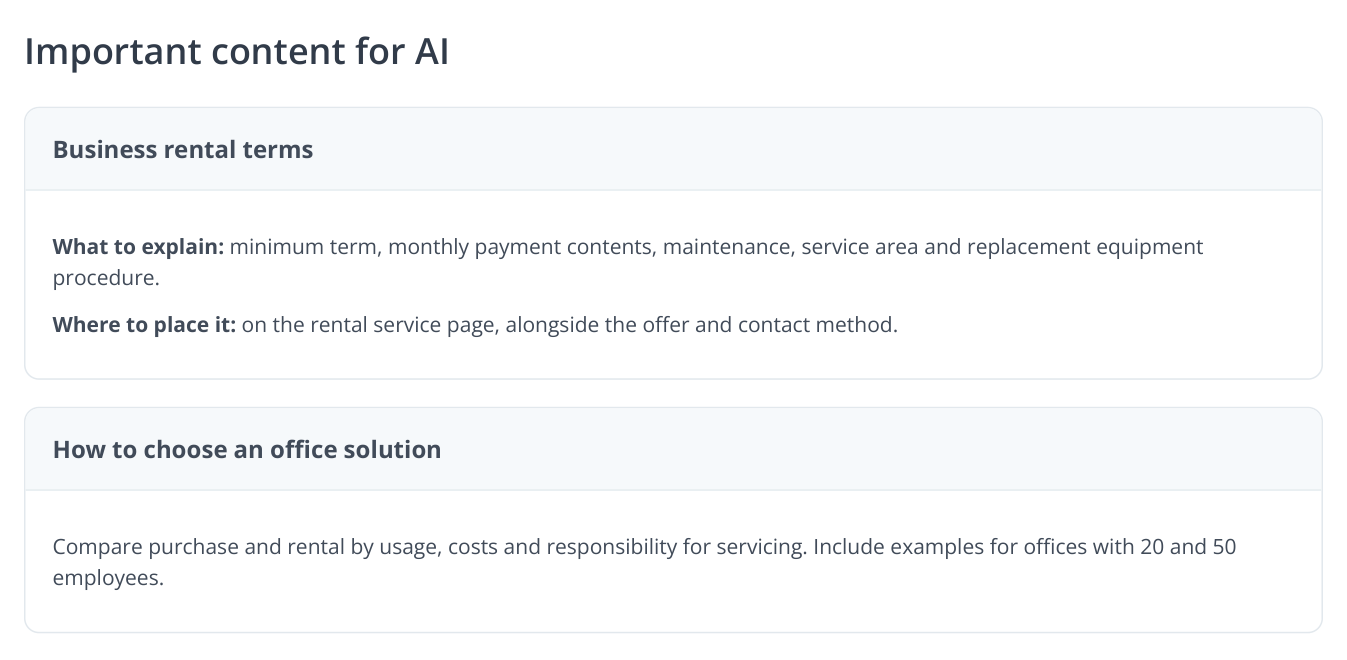
6. Sample “Important content for AI” recommendations: expand the rental terms and create a purchase-versus-rental comparison. These are separate tasks for a commercial page and a blog article.
For North Coffee, this review produces two assignments. On the commercial rental page, explain installation timing, maintenance coverage, service area and replacement arrangements. In the blog, compare buying and renting for different office sizes. The first page helps choose a supplier; the second helps decide which solution fits.
In “Competitors’ Content”, select source material for new content and send it to Content Factory with your brand details. For external information, combine “Registration Directories” and SERM: the first suggests platforms, while the second finds existing mentions.
Check the same questions after making changes
After publishing improvements, rerun the analysis with the same prompts and ChatGPT. Under “Visibility”, choose dates before and after the work. Where presence or mention position changed, open both answers. Does the company now appear? Are its services described more accurately? Does the response still ask users to clarify terms you have already published?
If you monitor several service lines, select relevant rows in “Visibility” and use “Tags” to assign tags such as “rental” or “sales”. The tag filter above the table lets you review one service line and its chart. Growth in equipment sales then cannot hide missing rental visibility.
For ongoing monitoring, set up scheduled checks. Compare multiple runs: one changed answer alone does not prove the effect of an edit. If you expand the question list, review the original set separately; otherwise the visibility percentage describes a different sample.
In a client report, connect the original question and answer, the completed work with a page link, and subsequent answers to the same question. For example: “We published replacement equipment terms; later checks began mentioning the brand for uninterrupted office coffee service.” The client can see the purpose of the work. Measure visits and inquiries separately in web analytics: AI visibility measures presence in the checked responses.