
 English
expand_more
English
expand_more
 Español
 Deutsch
 Français
 Português
 Türkçe
 Polski
 العربية
 हिन्दी
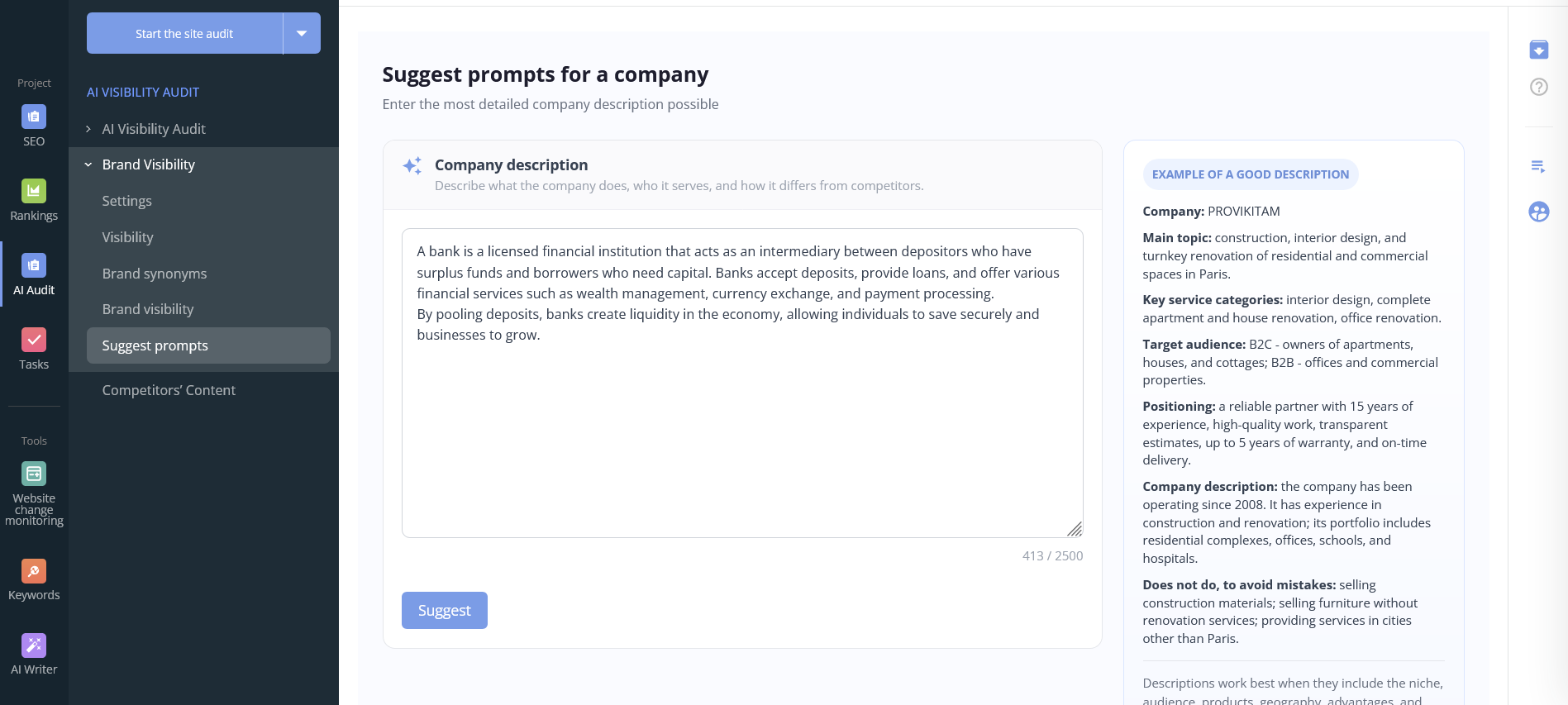
Suggest prompts for a company
To accurately track brand mentions in responses from AI assistants — including ChatGPT, DeepSeek, Gemini, Claude, and others — it's critical to use well-crafted search queries, also known as prompts. Vague or poorly chosen phrases can lead to false positives or, worse, cause you to miss genuine mentions entirely. The Prompt Generator report automatically creates relevant, tailored search queries based on a detailed description of your business.
What the Prompt Generator Report Contains
This is not a static document — it's an interactive experience. You fill out a structured company profile, and the system analyzes your text and semantic core to generate a comprehensive list of prompts. Here's what you get:
- A ready-to-use list of prompts (search queries) — between 10 and 30 phrases, grouped by theme (e.g., services, customer pain points, competitive comparisons, local queries).
- Priority recommendations — which queries are most likely to surface your brand in AI-generated responses.
- Variations in phrasing — synonyms, conversational tones, long-tail and short-tail versions that real users typically type when interacting with AI.
- Examples of unsuitable queries — to help you filter out false positives from the start.
All generated prompts can be added to your AI visibility monitoring settings with one click. From there, the system will regularly check for brand mentions across every query in your list.
Why Automated Prompt Selection Matters
Manually crafting prompts for AI assistants comes with several challenges — all of which this tool solves:
- Saves time and reduces expertise barriers. You don't need to be a prompt engineering expert. The system understands the semantics of your niche and suggests queries that real users are likely to ask.
- Minimizes human error. It's easy to overlook a crucial query — one that might lead AI to recommend your competitors while ignoring you. Automated coverage catches more possibilities.
- Adapts across different AI models. The same prompt can perform differently in ChatGPT versus Claude. The report provides both universal and model-specific variations.
- Provides a foundation for A/B testing. With a solid set of prompts, you can test hypotheses: which queries consistently surface your brand, and which fall flat.
- Stays current. AI models evolve rapidly, and query relevance shifts with them. By regenerating the report regularly, you keep your prompts fresh and effective.
Without quality prompts, brand monitoring is futile. You'll either receive empty reports or drown in irrelevant data. The Prompt Generator is the essential first step toward effective AI visibility tracking.
Who Needs This Tool
The Prompt Generator is designed for a wide range of professionals who want to monitor AI visibility but struggle to come up with the right queries. It's especially valuable for:
- SEO specialists and digital marketers — integrating AI monitoring into their strategy and looking to save hours on semantic research.
- Small and medium business owners — no in-house analyst needed. Describe your business once and get a working list of queries immediately.
- Reputation managers (SERM professionals) — keeping tabs on brand mentions across every possible customer question.
- Content managers and PR professionals — understanding which queries might surface their articles or press releases in AI responses.
- Product teams — testing hypotheses about which product benefits AI models "understand" best.
- Agencies managing multiple clients — quickly prepare prompt sets for dozens of different niches without manual legwork.
The tool is especially useful for companies with unique positioning or complex offerings (B2B, healthcare, construction, IT development) where generic queries simply don't work.
How to Fill Out Your Company Profile for Accurate Results
To get high-quality, relevant prompts, you need to describe your business as thoroughly and structured as possible. The system analyzes the following fields:
- Main business domain — your industry (construction, interior design, education, finance, etc.).
- Key service or product categories — exactly what you offer (design projects, turnkey renovation, material delivery).
- Target audience — B2C, B2B, or specific segments (homeowners, offices, medical centers).
- Positioning and unique advantages — experience, quality standards, guarantees, timelines, USP.
- Geography — city, region, or country where you operate.
- What you don't do — helps exclude misleading or irrelevant prompts.
Here's a real-world example of a well-structured profile (an interior design and renovation company):
            Company: PROVIKITAM
            Main domain: construction, interior design, turnkey renovation for residential and commercial spaces in New York.
            Key service categories: interior design, comprehensive apartment and house renovation, office refurbishment.
            Target audience: B2C — homeowners, house and cottage owners; B2B — offices and commercial properties.
            Positioning: trusted partner with 15+ years of experience, high-quality workmanship, transparent estimates, up to 5-year warranty, and on-time delivery.
            Company background: operating since 2008 with a portfolio that includes residential complexes, offices, schools, and hospitals.
            Not involved in: building material trade, furniture sales without renovation, services outside New York.
Based on a profile like this, the system generates prompts such as: "turnkey renovation in New York with 5-year warranty", "interior design for a family apartment", "affordable yet high-quality office renovation", "PROVIKITAM reviews", "construction companies in New York with 15+ years of experience", and many more.
How to Use Your Generated Prompt List
Once the report is ready, you can:
- Review and refine — browse all generated queries, remove any that don't fit, and add your own custom variations.
- One-click add to monitoring — select the prompts you want and push them directly into your AI visibility settings.
- Configure frequency and AI models — choose how often to check and which assistants to monitor (ChatGPT, DeepSeek, Gemini, Claude, etc.).
- Launch monitoring — start receiving regular reports on brand mentions for every query in your set.
We recommend regenerating the report whenever your product range, geography, or USP changes. It's also a good idea to generate a fresh list before major marketing campaigns.
Conclusion
Without high-quality prompts, AI visibility monitoring is ineffective — you'll either miss real mentions or be overwhelmed by noise. The Prompt Generator solves this by turning your business description into a precise, actionable set of search queries. You get a ready-made tool for tracking brand mentions across AI assistants, with zero manual semantic research.
Start by filling out your company profile — the system will do the rest, delivering prompts that actually work.
Ready to get started? Navigate to AI Visibility → Prompt Generator in your dashboard. The tool is available on all paid plans, and new users can try it in demo mode.