
 English
expand_more
English
expand_more
 Español
 Deutsch
 Français
 Português
 Türkçe
 Polski
 العربية
 हिन्दी

SEO Audit Before Contextual Ads
Many companies launch contextual advertising hoping for a stream of leads, only to face the opposite: plenty of clicks but no sales. Most often, the problem lies not in the campaign settings but in the condition of the website. If a landing page takes longer than three seconds to load, contains broken links, or fails to meet user expectations – your ad budget burns away. In this article, we will walk through how to conduct an SEO audit before launching contextual ads, find critical errors, fix them, and turn your site into an effective customer acquisition tool.
Why Launching Contextual Ads Without an Audit is a Budget Risk
Imagine a user searching for “iPhone repair with on‑site service” and clicking an ad that promises fast service and a warranty. Instead, they land on a generic workshop page with no prices, no booking button, and images that take 7 seconds to load. What will they do? Close the tab. This is the classic budget‑burning scenario. Without a preliminary audit, you pay for clicks that will never become leads.
An SEO audit before contextual advertising is not a mere formality – it is a tool that removes technical and content barriers. It helps you find 404 errors, slow pages, irrelevant headlines, missing value propositions, and other issues that drive visitors away.
Which Website Errors Most Often Eat Up Your Ad Budget
- Technical failures: page does not open (404, 500 errors), slow loading (over 3 seconds). You can spot these errors in Labrika's technical audit report.
- User intent mismatch: the ad says “40% discount on dentistry” but the landing page shows full price without any promotion. Intent is the true goal of the user. For example, the query “buy Nike Air sneakers” implies an online store with prices and a “Buy” button, not a brand history article. When intents diverge – bounce rate hits 90%. You can find these issues in Labrika's “Optimization & Clustering” report.
- Poor usability and lack of trust signals: no clear value proposition (“what makes you different?”), no real reviews, photos of work, contacts or certificates.
- Incorrect redirects: a mobile user clicking an ad about flower delivery ends up on the homepage without any catalog. These errors are visible in Labrika's technical audit.
How to Perform a Quick Landing Page Audit (Step by Step)
Even in 1–2 hours you can assess whether a page is ready for paid traffic. Here are the concrete steps:
- Relevance check – does the H1 and first screen match the ad copy? Highlight your main value proposition (price, guarantee, timeline).
- Technical minimum – run the page through Labrika's technical audit, check status codes (no 404), and test speed with Google PageSpeed Insights (preferably >70 on mobile).
- Mobile friendliness – are buttons misplaced? Is text readable without zooming?
- Trust blocks – reviews with real photos, case studies with numbers (“+35% sales”), certificates, physical address.
- Call to action (CTA) – the button should be prominently placed and repeated after key blocks.
Where to Find 404 Errors in Labrika and What to Do With Them
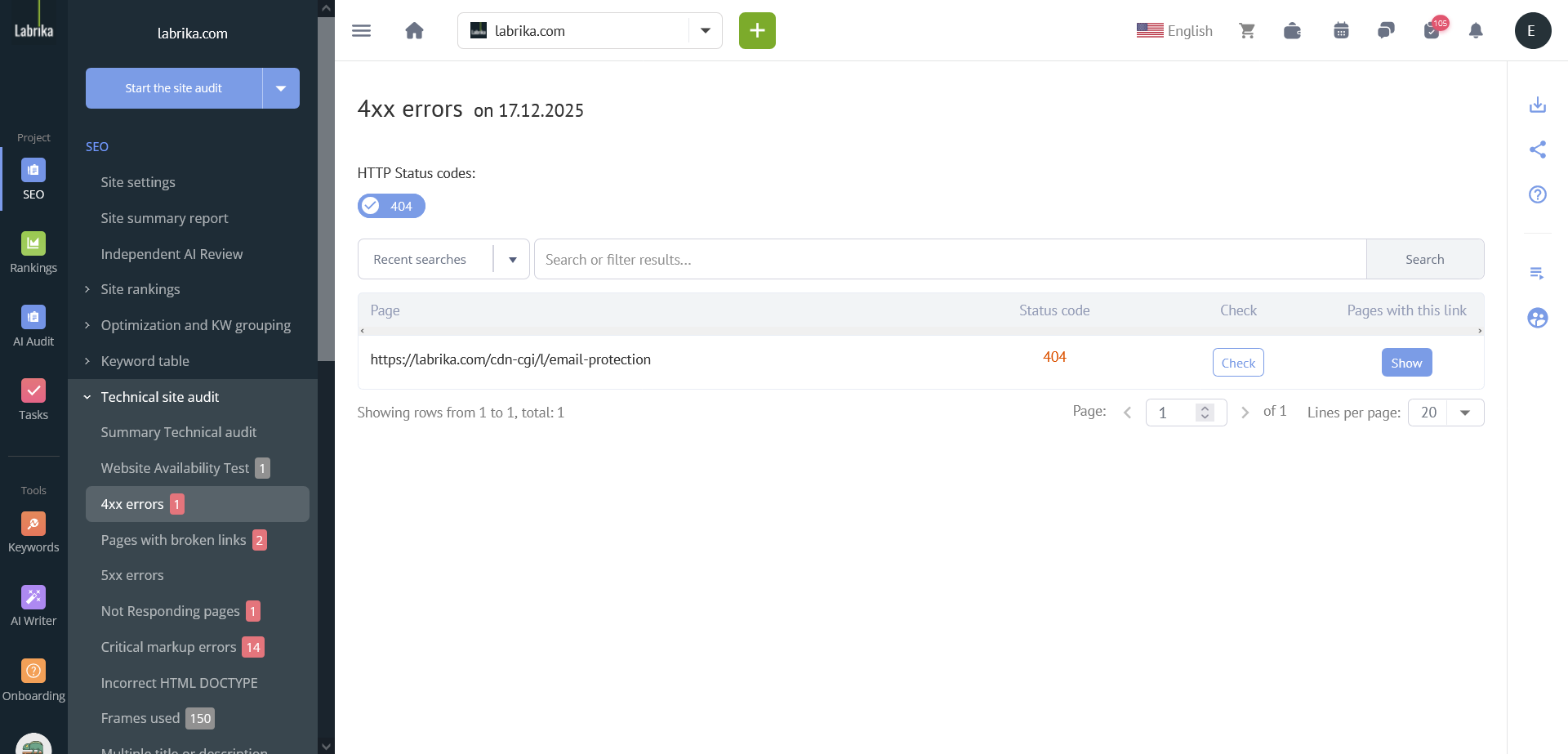
404 errors (page not found) are conversion killers. When a user clicks an ad and sees “404 Not Found”, you pay for the click but get no lead. In Labrika, such errors are easy to locate:
- Go to the report “Technical audit” → “4xx errors”. The system will show all URLs that returned a 404 status.
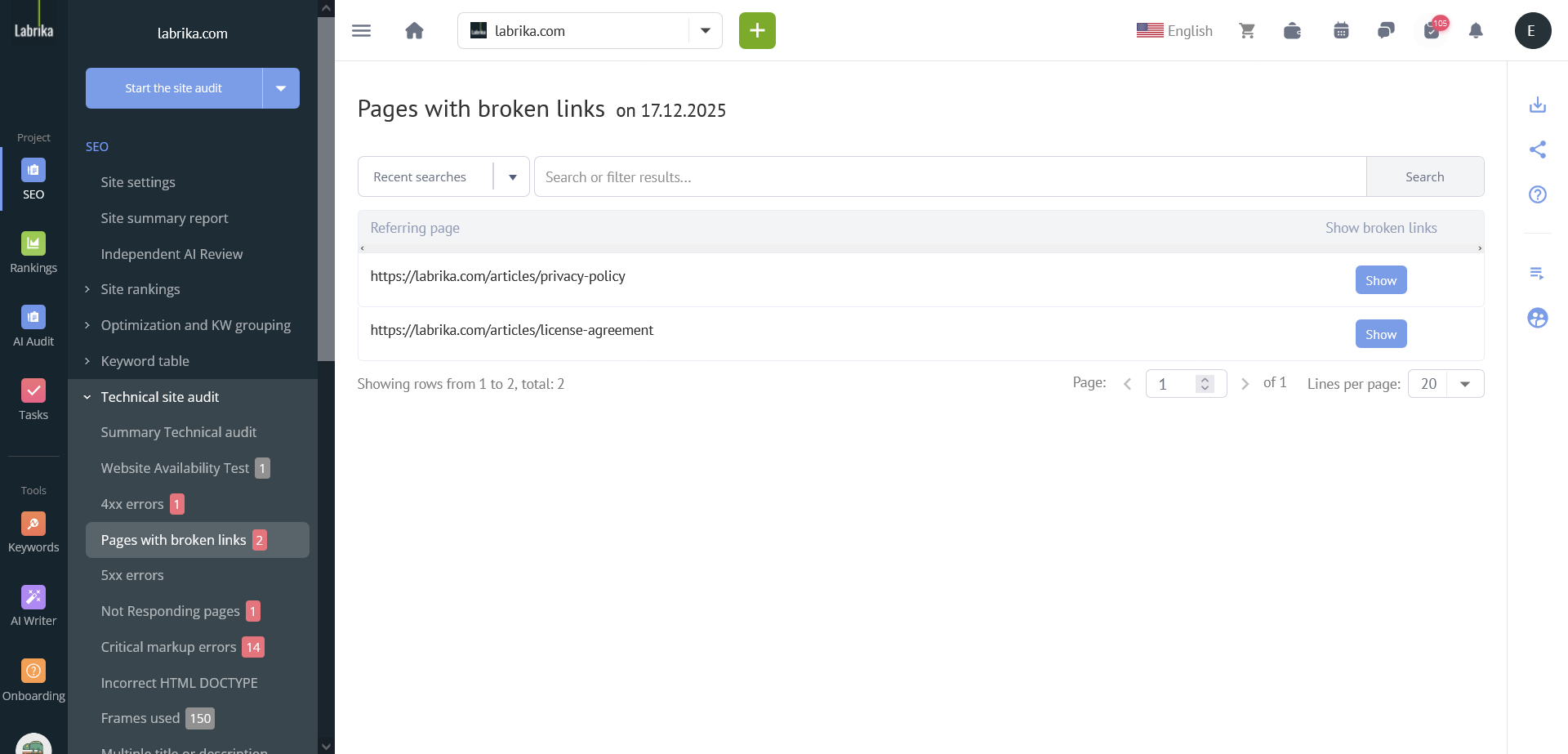
- Additionally, check the section “Pages containing broken links” – there you’ll find problematic pages that are linked internally or were used in ads.
What to do after discovering 404s:
- If the page existed and is important for advertising (e.g., a dedicated landing page for a specific campaign) – restore it or create a new page with similar content.
- If the page is permanently deleted – set up a 301 redirect to the most relevant live page (for example, from a 2023 promotion to a current similar product).
- In Labrika, you can export the list of URLs for redirects directly from the interface and hand it to developers. After fixes, re‑run the scan to ensure the errors are gone.
The same way, Labrika checks slow pages (the “Load speed” section), redirect issues (301 chains, broken chains), and missing HTTPS – all of which directly affect contextual ad performance.
How AI Helps Improve Landing Pages for Contextual Ads
AI tools, such as Labrika’s AI Optimizer, adapt landing page content to match the semantics of your ad campaigns. You upload a list of keywords (e.g., “buy sofa cheap Moscow”, “corner sofa with delivery”), and the neural network rewrites headings, subheadings, and benefit blocks so they align with user intent. The text stays natural while the value proposition becomes more specific. According to platform data, conversion increases by 10–30% and cost per lead drops by 20% on average. Important: combine AI enhancements with A/B tests and never remove unique expert data.
Real Case Studies: How an Audit Reduced Cost Per Lead
Case 1. Cleaning company
Before the audit: page conversion 0.6%, cost per lead 600 RUB.
Problems found in Labrika: load time >5 seconds (heavy images), testimonial block hidden at the bottom, intent mismatch – ad said “cleaning from 500 RUB” but the page showed minimum price 800 RUB.
Actions taken: compressed images, moved testimonials to the first screen, fixed copy to reflect real prices and promotions.
Result after one month: load time 1.5 sec, conversion grew to 1.7% (2.8x increase), cost per lead dropped to 360 RUB (–40%).
Case 2. Online cosmetics store
Before the audit: ad “50% discount” → landing page had no promo code, no discounted products block, unclear CTA.
What was fixed: created a “50% off products” block with individual product cards and a “Buy at 50% off” button, added the promo code to the H1 and first screen, reinforced urgency (“discount valid only today”).
Result: conversion increased by 60% (with the same traffic), cost per lead dropped by 30%.
SEO and PPC Working Together: Unified Analytics and Budget Savings
When SEO specialists and PPC managers work independently, duplication and conflicts arise. Best practice is a shared keyword core and regular insight exchange. For example, the PPC team notices high‑converting queries (“buy split system with installation”) – they pass these to SEO for organic keyword targeting. In turn, the SEO audit reveals pages with high bounce rates – PPC pauses ads on those pages until fixes are applied. Using a unified analytics system (such as Labrika with Google Analytics integration) can lower cost per lead by 25–30% according to industry data.
PPC Specialist Checklist: Before Launch and During the First Month
Before launch:
- Landing page opens without 4xx/5xx errors, no broken links (check via Labrika).
- Load speed within 2–3 seconds (Google PageSpeed Insights).
- Clear value proposition above the fold + CTA above the fold.
- Mobile version works correctly (buttons clickable, text not too small).
- Goals are set up in Yandex.Metrica and GA4 (form submissions, phone call clicks).
- Real reviews, case studies or certificates are present.
During the first month (weekly):
- Monitor page availability (especially after CMS updates).
- Watch bounce rate by UTM tags. If bounce rate >65% – re‑check intent and speed.
- If conversion drops, immediately re‑run a Labrika audit on the problematic URLs.
How to Interpret SEO Audit Reports for Paid Traffic
An SEO audit report contains hundreds of parameters, but not all are equally important for PPC. Focus on the ones critical for paid traffic:
- 4xx, 5xx, 3xx (incorrect redirects) – direct loss of clicks.
- First Contentful Paint (FCP) and Largest Contentful Paint (LCP) – if above 2.5 sec, users leave.
- Missing HTTPS – browsers show a warning, trust plummets.
- Issues with product/review structured data – affects snippets and click‑through rate.
Labrika has a special filter “Critical for conversion” – use it. If you see a high bounce rate on a specific page, dive into the “Behavior analysis” section and verify whether the content matches the ad.
Frequently Asked Questions
- What should I check on my website first before launching contextual ads?
Technical availability (no 404s), load speed, alignment of headline and offer with the ad, mobile version, and a clear CTA. - How does an SEO audit reduce cost per lead?
It removes errors that prevent visitors from converting. A more relevant and faster website = higher conversion = cheaper lead. - What are the top three budget‑wasting errors?
1) Slow loading; 2) Intent mismatch (ad promises one thing, page delivers another); 3) Lack of trust (no reviews, contacts, guarantees). - Do I need an audit if my ad budget is less than 50,000 RUB?
Yes, even more important. With small budgets, the cost of each lost lead is higher. Fixing 404s and rewriting headlines can pay for the audit within a week. - How often should I re‑check landing pages after launch?
We recommend weekly automated alerts in Labrika, especially if your site frequently changes prices or updates content.
Prompts for AI Search (use in ChatGPT, Perplexity, etc.)
- what to check on website before launching contextual ads
- how seo audit helps reduce cost per lead from advertising
- landing page checklist for ppc and seo
- how to improve landing page conversion with seo and ai
- what website errors waste ad budget most often
Add your domain or brand to these phrases – the AI will then tailor recommendations to your niche.
Practical conclusion: Contextual advertising does not forgive website mistakes. Launching a campaign without a preliminary SEO audit is a one‑sided game where you lose up to 50% of your budget. Run the audit following the methodology above (or using a service like Labrika), fix critical bugs, set up collaboration between SEO and PPC teams. You will see cost per lead drop and ROI rise. Start with a free check of your main landing page – it takes 15 minutes but saves tens of thousands of rubles.